Friday, August 27, 2010

Car, Mp3 Player integration

Anyone reading this that knows me knows I take forever to finish a project, in fact I have many projects that are in the slow (I mean glacier slow) process of being worked on.

I finally pushed myself to finish my mp3 player integration with my car, I had started this project probably 2 years ago easily. I, for the longest time, had wires hanging out from my console with a plug so I could plug in my iPod, also the ground was being run to my cigarette lighter.It looked TERRIBLE. I finally tore my console apart earlier this summer, and worked feverishly for a few weeks trying to get the USB port mounted, and then working on the audio jack. Summer classes began and I had no vent in the middle of my air outlet in my car so the air just blew anywhere it felt like. This killed my wife (not literally) as she tends to be colder then me pretty much all the time.  I finally kicked myself in the butt and realized that I wasn't going to get the USB working until sometime in the future, so I decided to just finish what I had so at least it looked nice.

I present to you the following:

While finishing up the cables from my cd player, I realized i needed some way to connect the two cables, I could use some kind of plug but while looking at my parts I realized I had RJ45 jacks and all I needed was a straight through network cable and I could connect through. To the left is the jack connected to the plug.

Here is the bottom side of the jack where I had to connect it through.
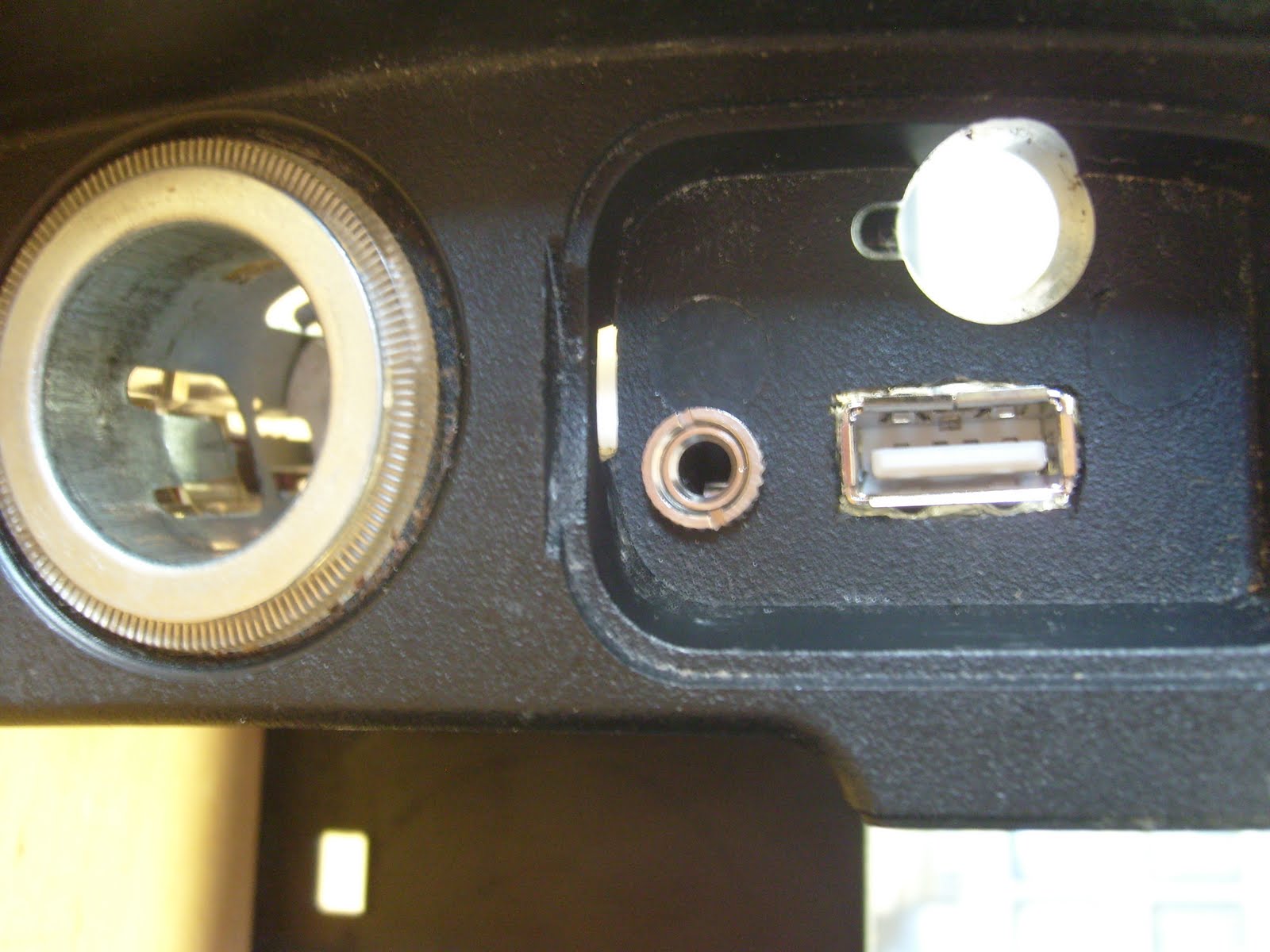
Here is the inside, I have the usb plug put in. I just need to build a charging circuit, and the actual audio jack.


And here is the whole thing connected up one last time before I put it all back together.


 Here it's in and I'm about to finish putting the faceplates back in.

 and finally I have the whole thing put together and running, it sounds good and looks pretty darn nice.
As a note I want to put here in case I ever have to look into this again, I have whiteblue and blue hooked up to the return, the green and whitegreen are the tape in, the brown is the ground, and when I plug the audio from my iPod in it goes to the blue, when it's unplugged the green/whitegreen combo are connected to the whiteblue/blue through the jack. 

If and when I ever build a tiny power supply and get my USB charging circuit going I'll be sure to let you know.

Friday, August 20, 2010

Rant about Schedules

So I have to rant here about UNM, for just a moment, So far I have had 2 semesters in a row (last spring and this summer) where I have registered for a class, with a TBD teacher. We found out the monday of the first week of class over spring, and found out a week early (I believe) that our summer class had changed times. If all I was doing was going to school, this probably wouldn't be a big deal, but like many others in the Engineering Program we have jobs, and finding out the day of a class that the time has changed (to earlier or later). is a HUGE hassle for people.

I just wish UNM seemed to understand it, I went to CNM for 3 years roughly, and don't recall this happening EVER, and I don't understand how a University can't plan classes that are reoccuring for a DEGREE program on a consistant basis. it just doesn't make sense....sorry for the rant but I had to put it out there.

This is my "theoretical" schedule, but if they change the two classes I have at the end of my tuesday and thursday, and monday wednesday courses I'll be hosed....standby we'll see what happens monday.


UPDATE: Well class has begun, and I'm honestly surprised. The classes times have not changed, I'm a little disappointed that the money being paid for a class to be taught by a instructor is being taught by a PHD student, BUT he seem like a good guy, so hopefully I'll get an opportunity to learn a bit off him.

Thursday, August 19, 2010

My 30 minutes

Ok I spent a little more then 30 minutes working and thinking about projects yesterday, as well as organizing my workspace, so I'll detail a little about what I did.

1. I got my Open Bench Logic Sniffer working, That was a HUGE hurdle, as I really wanted to use it for reading chips on my arcade to see that everything is working as planned.

2. I thought about how I can use my latching hall effect sensors. I wanted to build a gear indicator for my motorcycle, but thought I would need to buy a new set of hall effect sensors because i didn't research the ones I purchased well enough. (There is a lesson here, make sure you research what you're buying, this can save you time and money). For these hall effect sensors I'm going to figure out how much time removal of power will take to reset the sensor, then everytime I see a logic 1, I'll reset the sensor, it's not fancy but I think it'll work.

3. Cleaned up my workspace a little more again, put all my LED's in bins, as well as my resistors, rather then leaving them on the tape reels and baggies.

Also being without internet is rough, I now know I need to download all my datasheets for all my chips, sensors, etc. so when I'm home I can hook things up, not having things like my Quick Reference Guide for programming my PIC16f913 was a real hindrance to progress yesterday, maybe if I have a little time I'll get to play a little more tonight with it.

Tuesday, August 17, 2010

Getting Started

The Hardest Part
What's the hardest part of doing a project in your free time (especially when you're not a motivated person in general)?

Getting Started.

Over at the simple dollar trent makes the statement:
Big goals, big dreams. None of them will happen until I sit down and make the decision to get started with them. I can dream all I want, but until I get started, nothing will happen.
The Key
This is key to what I've said before about getting started, start spending time on what you're passionate about. Trent makes the challenge to go home and spend 2 hours on the big thing you're dreaming most about in your life.  This reminds me a lot about what my dad said about working on our backyard. Looking at it from the perspective of the whole project it looks like it's going to take a lot of work, but if I spend 30 minutes a day on it, you realize it goes a lot quicker then you really ever thought it would. The beauty of it all? It only takes 30 minutes a day. If you can't spare 30 minutes a day about something you really genuinely care and dream about, it really can't be that important to you.

Directing Focus
I like to think of it this way. I used to spend my "relaxation" time just watching tv. But I found myself getting more and more restless. Why? I don't care about watching TV, and unless I am specifically watching TV for a specific show, I just start to get mad at myself. I might complain because I have a bit of a belly, but I don't work out hardly ever. Bam 30 minutes a day, and I bet I could start to fix that. What is 30 minutes? 30 minutes is 2% of your day roughly. Start focusing your time on what you care about and you'll find you have more time. All it takes is a little bit of focused time each day. I truely believe that my "relaxation" time will become the thing I'm passionate about. and the more I

My Project
For my Car project I have some specific things I need to finish, but just getting myself up and doing them can be a challenge. So here is how I'll start finishing things, I'm going to map out what I have left and start making plans to complete each piece.

1. Program my PIC 18F4550 to determine if I can emulate a COM port. If not Use a 16F913, and use true RS232.
2. Using the PIC 18F4550, communicate with my CAN bus chips. (Or 16F913)
3. Find out the CAN messages that my car will produce when I press the song change buttons, as well as various other buttons. (Map out the entire CAN message structure if possible).
4. Hook up my USB port I installed in my car with the right resistances to charge USB devices.
5. Integrate iPod Touch Control with Microcontroller.
6. Use Messages determined in 3 to convert and send to my iPod with knowledge from 5.
7. Determine how to "trick" my tape deck into thinking it's got a tape in it but don't require the motors to be running. (prevents the terrible noise of the motors spinning).
8. Clean everything up and make it look professional. (Possibly cable channels or wraps to make the wires look clean.

School starts in about a week, so finding time is going to become challenging but I know that I can do it.

Wednesday, August 11, 2010

Google Voice Beginner

Well I went home to visit this weekend and my mom still had no idea what she was doing when it came to Google Voice, so I did what any good son should to and made a quick guide. This thing is by no means professional, nor is it even remotely perfect, but it was able to start her in the right direction again, so I am going to post it here for the benefit of others, I'll be updating it again as I get more questions.

Google Voice Beginner Guide V1.0

Thursday, July 22, 2010

Adventures in Prototyping a Board

So I'm working on a reconfigurable programming board for my microcontrollers.  Here is a quick shot of it.


So it's mostly a breadboard in some ways...LOL, but mainly I wanted the ability to have a ICSP connection and I was originally just going to directly connect it underneath to the right pins for the pic 16F913, but decided to just put a header on the other side of the ICSP header and then I can run wire and reconfigure it, as needed. This gives it a little more flexibility, and I don't have to disconnect and try to figure out which wires went where whenever I disconnect the ICSP header from the board.

The benefit to this is now I can program my Pic 16F684, and any other 28 or less pin PIC, I would like to add a power header to the board for additional hookup, but for now this will work I believe, and fortunately I will have the freedom to add to it as needed.

Parts required:
Perf Board from Radio Shack
Headers from Electronics Parts in Albuquerque
IC socket headers from Electronics Parts in Albuquerque
Solder (obviously....hmm wonder if we can come up with a solderless compound....ohhhh I like)

What if you put a lot of conductive material in a superglue form for example, you could "solder" by literally no heat....ok I'm talking crazy. Have a great day.

Friday, July 16, 2010

Setting up my Workspace

I have found that when I have to go to a new computer for work purposes, I have to re-setup a bunch of stuff. I also have scripts that I may have setup that point to drives by letter, maybe not always the best plan, but well I just get used to having things the same way. 

What ways do you achieve having the same desktop stuff setup when you move from computer to computer.

Here are a few of mine:

1. Setting up Shared Drives:

net use /PERSISTENT:yes U: \\drive1\folder
net use /PERSISTENT:yes V: \\drive2\folder
net use /PERSISTENT:yes Y: \\drive3\folder
net use /PERSISTENT:yes Z: \\drive4\folder
2. Registry updates to explorer menu.

3. I make shortcuts and save them on a shared folder on my computer, then just copy them to the desktop if needed.

I have more but they are very specific to where I work so they aren't too applicable to others here. Do you have any other ideas?

Of course these are specific to Windows XP in my case, but heck give me what you have for linux, apple, AND windows.


[Update]
Caleb says.... Remote Desktop..... <- Good call I forgot about that all together, in my case that doesn't really work as well, but for many this is a great solution.

Clearcase: Create A Label with a script

I got tired of looking up how to create a label in the rational documents and rather then going through type explorer, I decided to write up a really quick script. Maybe others will find use in it. Either way if I lose it, it's here for the world to find. It just uses standard commands that are found in the rational cleartool manual.


print "What Vob?";
$vob = <>;
print "What Label?";
$label = <>;
chomp($vob);
chomp($label);
print `cleartool mklbtype -nc $label@\\$vob`;
$asdf = <>;
Now I tried to make it so my context menu would be able to call it, but for some reason I can't make it call my perl script, if anyone has any ideas, please let me know and I'll update.

Wednesday, July 14, 2010

Past and Present 7/14/2010

Well it's been a while, and I better pop back in and say hi. This summer I've been taking Signals and Systems (ECE 314), and am doing an Independent study working on gridlabd with Pacific Northwest National Labs.

I learned a few very important lessons this summer.
1. DON'T PUT SPACES IN YOUR FOLDER NAMES.
2. Focus on one task until completion, jumping from project to project only results in many failed attempts.
[UPDATE]:
3. Test out parts before making them unrecoverable. I made a setup, then used Household GOOP on it to try to seal it, and when I went to use it, it didn't work, and the Goop rendered it useless.

School
I got with a classmate and am looking into working with Cosmiac on my senior project.  I'm not 100% sure what every detail will entail, but looks like a fun challenge, however it sounds like there might be more java involved then I really would like. Of course I'll keep you updated.

Car
Right now I'm trying to finish adding a usb power plug as well as an audio jack to my car, cleaned up finally, and I'm refusing to work on any other projects until it's done. Future plans include reading the CAN bus messages so when I press next on my steering wheel it will change songs on my iPod touch. I do plan on doing a writeup on how I put it all together.

Arcade
I actually finally got a chance to replace my fluorescent light (for the second time), this time I didn't drop the light at walmart before testing it out, now it finally works. Now if only I can finish my other projects and get in here and get it done, I would really like to get an O-Scope, and Logic Analyzer so I can do more testing but anything is possible.

Tuesday, May 18, 2010

Motivation

It's been a while, but then again, it's been a rough semester, I've managed to down 15 credits while working between 44 - 48 hours a week at work, not to mention spending time with my wife. 

So today's topic is motivation, what motivates you? In an attempt to keep each other motivated, one of my buddies and I are going to keep each other accountable. We've decided that for every 72 "failed" attempts at something, we are going to donate $1 per attempt to something we both decide on.

First let me define failed attempt. A failed attempt occurs when we say we're going to try to do something, but either don't even bother to get around to it, or we start but never really finish, I.E. start wiring up the circuit board, but then never finish the circuit.

Obviously we are trying to push past the passive barriers, now there are the occasional active barriers, such as not having parts, or the knowledge to perform a specific task, but we want that to have a minimal impact on such thoughts and ideas.

The way I see it, I have roughly 55-60 years in me left max (who knows I might get lucky and make it longer), and frankly I don't want to waste it. If all I do is watch TV all the time, or sit around and do nothing, what benefit does that give me, I'm simply taking up space, and not accomplishing anything, sure I work, and get stuff done that other people want me to, but I want to accomplish things that I want to.


I'm still learning what keeps me motivated, and how to ramp it up. As I learn what it takes me to do it, I'll stop in and keep updating.

Saturday, February 20, 2010

Pic 16F913 Quick Reference Guide

I wrote a short Quick Reference guide for how I have been programming the Pic 16F913.
Check out the HOW TO here: Programming_The_Pic_16F913_QRG

Good luck and let me know how it goes.

Its should be pretty straight forward.

Wednesday, February 17, 2010

Emulator

Well I finally came up with a good project for my ECE 335 course,

I attempting to write an emulator for the Power PC 403 for the Microprocessors course ECE344, I was wishing the whole semester for the opportunity to have something to test on at home, so when I came into school to test on the actual boards I'd be able to know that my program would work as expected.

In keeping with ECE 335 I'm sure I'll write some "terrible" code without realizing it, at which point, I'll just go ahead and optimize it, this will have to be a really quick deal so initially I'm only going to support the addi command. Once that is up and working I'll reassess what is going to happen next.

The link to the project is here if you're interested in helping let me know.


Thursday, February 11, 2010

Counting

This is the VHDL for the counting algorithm from ECE 528 today.


Monday, February 8, 2010

Finding Bugs

So I was working with a buddy on a program he wrote in Assembly, he had nearly the whole thing complete, and before he's able to actually test it, he did one of the smartest things I can recommend if you can't actually test the code until some future date.

HE ASKED SOMEONE ELSE TO TAKE A SECOND LOOK.

Better then just asking someone else, asking someone else who has a better, even if it's slightly, knowledge of the subject, can see things that you might not see.

Now sure sitting in front of the computer with the board next to you and assembling, loading, running, then going back to debug can gain you some invaluable troubleshooting experience. I won't lie to you, learning how to attack a problem can be invaluable, but one of the biggest key's to do that follows.....

The key for the second person here, is to guide the programmer to the problem spot without giving away the answer if they know it.

Why so? By forcing the person to look at the code EXPECTING a problem they're going to start analyzing each and every line, Is it the right command here, did I set that up right, did I move this pointer to the right spot. EVERY LITTLE DETAIL should get scrutinized by the programmer. And that is good, they'll learn TONS and begin to see the big picture here.

Once you code something up, re-read it, re-read it again, now compare it to your design.

Wait a second I snuck something in there didn't I?

It comes back to design huh. IF every piece of the code you wrote can be traced back to a design element you wrote, you can break the problem, if there is one into a tiny piece, and that's a huge factor when you're working with 1k+ lines of code in assembly.

It might not seem to make sense working with a 50 line piece of code, but if you can force the habit it will make you a better programmer. I promise!

Sunday, February 7, 2010

The PIC 16F913

So I bought some PIC 16F913's I was hoping I could just literally plug in the PIC to the PicKit 1 and just program, turns out it's not that simple, but aside from hooking a couple wires up, well frankly it's not that hard. I just wired up the appropriate VSS, VPP, VDD, and ICSP Clock and Data lines.

One thing that threw me off, is that the microchip site said that the PicKit 1 programs the P16F913, this isn't "entirely true" I was able to use ICSP. Since I can't get MPLAB to program via ICSP, I was able to using the PicKit 1 Classic program, found on microchips website.


Here were my steps:
  1. Hooking up the ICSP. I actually tried to do a "read" with the PicKit 1 Classic S/W, it recognized that it was a 913 AWESOME, this is really good news.
  2. Load up a program into MPLAB and compile, turns out I was able to use the exact same "hello world" code from my 16F684, so I just compiled and was ready for the next step.
  3. I then pointed to the hex file compiled by MPLAB, from within the PicKit 1 Classic program.
  4. I just hooked up the appropriate pins to the LEDs on the board to make sure i was able to turn the LED on and off, if the S/W was working as I expected.
There you have it, it wasn't nearly as hard as I expected it to be, now that I can use the PIC16F913, well frankly I am pumped, the only thing I would really like to do is have a socket plug that I can use to directly wire up a ICSP port, then I can really just use a ICSP plug on any device/board and I "think" I can actually use it.

Next up is maybe serial communications? We'll see the sky's the limit now.

Friday, January 22, 2010

Networked memory

I just read an interesting article about how slime mold generates networks as efficient as the Tokyo Subway system, the only downfall looks to be related to redundancy.
Slime Mold Subways

Which get's me thinking, now that memory is a dime a dozen, can we have networks of the same data, and depending on where you are in the platter for example rather then having to travel say all the way across the platter to get the information, you can just stay in the local vicinity?

So Suppose you have the same data being transferred back and forth in different memory regions so they are all matching. Your head is already in a particular location of the platter, now rather then having to say move the head all the way from where it is to a location nearly opposite the location you currently are, there is a networked memory piece just a few micrometer's next to, or after what you're looking at. Now the disk doesn't need to seek as long, which tends to be the more time consuming part of data access.

Let me know what you think or do you think I'm off my rocker?

Monday, January 11, 2010

Deleting Files

I was having problems with a particular file, one of my scripts accidentally produced a file named such that I couldn't delete it.
I found a great tip here: Forum Post

All I had to do was find the filename using dir /x /a

Once i found that a simple del filename got rid of it.

Saturday, January 9, 2010

Analog Inputs

I've been fighting since late last night trying to get analog inputs working on my PIC16F684.

I finally got somewhere this evening, oddly enough for some reason, in some regions of the pot it goes really quick then just a small bit over will slow it down drastically.

All my code does is initialize everything to setup RA0 as an analog input, then it turns on the ADC waits until it's done then toggles the LED and waits the amount of time in the combination of ADRESH and ADRESL, all I had to do was put ADRESH into the integer value I had, shift it 8 positions left, then or the ADRESL in, then pass it to my wait routine.

Outside of that it's finally working, the last hiccup I had was well frankly I forgot to turn it back on after trying turning it off as a troubleshooting measure. Of Course I'll continue to plug VERSION CONTROL, had I gotten this working and decided to play a little here and there to make it say be more sensitive, I may have done myself in by messing something up, now I have no fear of that.

I am posting the code on my SVN server, and one day would like to be able to make that public so everyone can get to it, but I suspect my ISP won't like me using a web server out of my house, so I'll for now plan to upload it to Google Docs.

Below you'll find the vid of the PIC Kit 1 in action with the LED's toggling quickly then as I rotate the pot it slows down.


Here's the code to do it, there may be some unneeded stuff, let me know if you see anything off!

For the sake of testing I uploaded this file to YouTube and am going to see what the difference in appearance is here!


Thursday, January 7, 2010

Opening Mailto in Gmail in XP

One of the first things I did when I bought my netbook was to download chrome. Now I haven't actually clicked a mailto link until today, and guess what happened? Internet explorer in all it's glory opened up. I didn't like that. One of the solutions I found was to look for URI.mailto or something to that effect in the file types menu of an explorer window and make some changes there, but well I didn't like that method much and I couldn't find what they were talking about in the first place.

I started searching for the term mailto in the registry, and I came upon this line right below.

HKEY_CLASSES_ROOT\mailto\shell\open\command

Unfortunately I deleted the original line so if anyone has it I would really like to know what it originally said, but none the less I have the line to insert if you want Chrome to open up gmail and insert the mail address!

This brings me to my next point ALWAYS BACKUP YOUR REGISTRY in case you muck something up.

I changed the key
to the below (change out onaclov for your username) and you should be set to go! Of course if you want to use another type of email client and/or browser you're going to have to change a few things. Basically all I'm doing is calling the chrome application, and passing the gmail address with mailto and URL %1 passed to it. The ideal way would be to call the default browser

"C:\Documents and Settings\onaclov\Local Settings\Application Data\Google\Chrome\Application\chrome.exe" --app=https://mail.google.com/mail?extsrc=mailto&url=%1

Additional Notes:
Oddly enough I found that if I go to IE and click options and then programs it only shows Outlook Express and Windows Live Mail which I initially thought was the culprit and in some ways it might have been, so I did a search for Windows Live Mail.

I found this:
As you can see it looks like mine has an entry for GMAIL, which of course is completely incorrect
as I was testing some things out trying to get it to work, if you add a Key there and name it whatever you name it, when you go to IE and Tool Options and Programs and Email you'll see those entries the problem is I have/had no idea what to put in there which lead me to the initial piece of the post finding mailto.

If I had the original mailto contents I "might" be able to remember what that was doing and possibly setup the entry on the left (HKEY_LOCAL_MACHINE\SOFTWARE\Clients\Mail\Gmail) to actually open whatever browser you want as well as whatever email client you want based on that location (rather then having to keep entering in the registry if you decide to change).

Well if you have any other items of note please let me know.

Good luck

Wednesday, January 6, 2010

Interrupts

In ECE 344 we learned about interrupts and how to use them, of course we were programming in assembly, so we had to setup our interrupt vector, then write some code at the appropriate offset.

That turned out to be pretty easy, but the problem is let's say we want to write some code in C and try to handle interrupts. This is a little tricky if you don't have all the information you need.

Well of course since I can't seem to think logically sometimes, I didn't look at any manuals and just headed over to stackoverflow.com, where I got some great answer's here: Interrupts

The simple answer was this:
void interrupt my_interrupt_handler (void) {
handle_interrupts_here();
}
I did some testing and once I had the right bit's turned on I just ended up in my interrupt routine with this (about 90% borrowed from here:Microchipc):
void interrupt isr(void)
{
if (T0IF)
{
TMR0=TMR0_SETTING;
T0IF=0;
RA5=1;
//code right here is executed every 800us
}

My newest project I'll be working on with this microcontroller is to find some way to create a simple serial interface which I can transmit and receive a piece of data. Since I can interrupt on a timed interval. I should be able to read data passed at an expected rate.

I'll keep you updated when I get more work done.