Well I went home to visit this weekend and my mom still had no idea what she was doing when it came to Google Voice, so I did what any good son should to and made a quick guide. This thing is by no means professional, nor is it even remotely perfect, but it was able to start her in the right direction again, so I am going to post it here for the benefit of others, I'll be updating it again as I get more questions.
Google Voice Beginner Guide V1.0
Showing posts with label Google Voice. Show all posts
Showing posts with label Google Voice. Show all posts
Wednesday, August 11, 2010
Wednesday, December 2, 2009
Google Voice Ideas
I was logging into google voice again, and found myself in a familiar world. I send a text message, and when the person replies it's in my inbox AND my phone. The problem is, I have one of those crappy phones so I have to constantly be deleting messages because I run up to the limit.
Here's my thoughts, if you get a text message in Google Voice AND you're logged in, it gives the text message say 1 minute to sit in the inbox doing nothing, if you immediately respond INSIDE google voice, it doesn't bother sending it to your phone, additionally you could add a "send to phone" option for a text, then it will still send it to your phone in the event you're getting directions and you won't have internet access when you leave your computer.
Well there you are just one more idea.
Here's my thoughts, if you get a text message in Google Voice AND you're logged in, it gives the text message say 1 minute to sit in the inbox doing nothing, if you immediately respond INSIDE google voice, it doesn't bother sending it to your phone, additionally you could add a "send to phone" option for a text, then it will still send it to your phone in the event you're getting directions and you won't have internet access when you leave your computer.
Well there you are just one more idea.


Tuesday, November 17, 2009
Google Voice Screwups
This is a pretty hilarious site, they allow anyone to post google voice to text translations which many times turn out to be quite hilarious.
http://gvscrewups.blogspot.com/
Now here's my question some people post the "before" and after versions, is it possible to improve the translator's capabilities knowing this information?
Check it out and let me know what you think.
http://gvscrewups.blogspot.com/
Now here's my question some people post the "before" and after versions, is it possible to improve the translator's capabilities knowing this information?
Check it out and let me know what you think.
Wednesday, November 11, 2009
Google Voice
I just ran into another situation where Google can integrate their google voice application into, Google Maps!
I was searching for my doctor's office, it brought up an address and phone number, why not have a clickable link for those logged in that have GV, and they can click call this number and select which phone to ring, OR even text message address/directions to myself....
Just another little idea for the wide world of google voice
I was searching for my doctor's office, it brought up an address and phone number, why not have a clickable link for those logged in that have GV, and they can click call this number and select which phone to ring, OR even text message address/directions to myself....
Just another little idea for the wide world of google voice
Wednesday, August 12, 2009
GV FAQ
I recently had a conversation with a couple people at various times asking me similar questions, so here are some of the common questions and answers, let me know if you ha ve any questions, I'll gladly post my answers.
Google checks to see if the number is a contact, if so it will stick
their name in the text otherwise they stick the number in the message, then send you the contents of the text message.
Unfortunately that appears to be the only way that it works as of this
point, so basically expect to get some crazy number, but it'll have the
person's name or number (depending on if they are a contact yet or not),
now when you respond, you simply respond to that number, (just by
hitting reply), once you've done that, I imagine google parses the
initial portion (containing name or number) and sends them a text
message from your google number (oddly enough)
So basically if you have their number in google contacts you'll know
who's contacting you, fortunately I was so worried about losing my phone
and contacts that I had already had my google contacts updated by the
time this came along, now apparently there is a way to upload the phone
book to google contacts (via CSV), and that being the case you can
export your phone's contacts via CSV, the only toughie, is converting
one to the other,You might be able to convert using perl or some such script and then all you have to do is upload it to google, and you're golden.
customers will see the google voice number come across, as far as
texting other people, unless you text them "through" your google voice
number, you are still literally using your number, it doesn't
automatically take your texts when you send them and send them through
GV.
The problem with "regular" phones, is if you want to call/text
someone through Google voice, using your phone (and not replying to a
text), you will have to call your google number (not sure how yet, I'll
have to look it up) then from there tell it who to call, so it's kinda a
pain unless you have a smart phone and can use an app, I.E. if you have
your ipod touch setup (jailbroken not that you would do that), you might be able to make that work, or Android and Blackberry already have apps in place.
What I've "been" doing is I'll go to the site and click call next to a
contact (or you can type in a number) then tell it which phone to ring,
then your phone will ring and then you will be connected with the
outgoing call to the number you wanted to call.
So what does that mean?
Basically if you don't have a smart phone, calling and texting (from
your phone) is a PIA, (except texts where you have already received one
on your phone), from the web interface it's pretty slick.
There are more I'm sure but this is a good start.
ve any questions, I'll gladly post my answers.I had my sister txt me at my GV number and it came up someSo here is the story, basically, the text message goes to google, then
wild number, with her number in the txt message itself. So....its like
I get a message from 405 xxx xxxx and I have no idea who it is. I named
it "google" just to see, and had my other sister txt me and it was a
different (but very similar) number. Is that how it works? I'm
guessing it goes through google, and google is actually the one txting
me correct? If so, how do you know who is txting you? There is no way
I am remembering everyones numbers.
Google checks to see if the number is a contact, if so it will stick
their name in the text otherwise they stick the number in the message, then send you the contents of the text message.
Unfortunately that appears to be the only way that it works as of this
point, so basically expect to get some crazy number, but it'll have the
person's name or number (depending on if they are a contact yet or not),
now when you respond, you simply respond to that number, (just by
hitting reply), once you've done that, I imagine google parses the
initial portion (containing name or number) and sends them a text
message from your google number (oddly enough)
So basically if you have their number in google contacts you'll know
who's contacting you, fortunately I was so worried about losing my phone
and contacts that I had already had my google contacts updated by the
time this came along, now apparently there is a way to upload the phone
book to google contacts (via CSV), and that being the case you can
export your phone's contacts via CSV, the only toughie, is converting
one to the other,You might be able to convert using perl or some such script and then all you have to do is upload it to google, and you're golden.
The other odd thing is, I haven't told anyone else this new number, andFrom the looks of things, google voice customers texting to other
I've been txting all kinds of people and no one has really said
anything...like "who is this" when they get my txt. As far as I know,
they don't see anything different - just like its txting from my regular
number. And on the google voice page there are only the conversations
ive had with you, and when I had my sisters txt me. I don't think that
you are in my contact list, and when you txt me it comes up as the new
number I put in your phone?
It seems it treats google voice members differently? So it does not
give me a random number with you, even though you are not in my
contacts.
customers will see the google voice number come across, as far as
texting other people, unless you text them "through" your google voice
number, you are still literally using your number, it doesn't
automatically take your texts when you send them and send them through
GV.
The problem with "regular" phones, is if you want to call/text
someone through Google voice, using your phone (and not replying to a
text), you will have to call your google number (not sure how yet, I'll
have to look it up) then from there tell it who to call, so it's kinda a
pain unless you have a smart phone and can use an app, I.E. if you have
your ipod touch setup (jailbroken not that you would do that), you might be able to make that work, or Android and Blackberry already have apps in place.
What I've "been" doing is I'll go to the site and click call next to a
contact (or you can type in a number) then tell it which phone to ring,
then your phone will ring and then you will be connected with the
outgoing call to the number you wanted to call.
So what does that mean?
Basically if you don't have a smart phone, calling and texting (from
your phone) is a PIA, (except texts where you have already received one
on your phone), from the web interface it's pretty slick.
Hmmm, it seems like most of this google voice thing is a pain in the assSo what is the benefit of a Google Voice number?
- and I don't really see where the benefit is. But its fun enough to
play around with though and txt people through the interwebs and they
won't know who it is.
- One phone number that you keep and you don't have to worry about "transferring" from carrier to carrier.
- Central number that can call any/all of your phones, much like calling a 1-800 number to get ahold of a company and then they route you through the system to the proper phone, you now have this ability, nice if you have co-workers, friends and family constantly calling you can route them, or setup call schedules for different phones (see call schedule post).
- I can't stand texting from my phone, but frequently have an internet connection so I can use the much nicer keyboard from my iPod or even my desktop to handle this cumbersome task (for my phone anyways)
- You get to pick your number, basically if you can think of one, try searching for it, and you can have it if you find it, most carriers just give you a choice of a couple numbers (terrible).
- Call Schedules.
- Voicemail transcription, It still needs work, but if it transcribes your messages close enough you can get a gist of it, and know if you really want to listen to that 2.5 minute VM, or have a good enough idea after a few words what it's all about.
- LOGS! I occasionally like to have record of conversations with people GV does this multiple ways, one you can record conversations (haven't tried this yet), SMS logs, and Voicemail logs, no more having to store your max text messages and deleting only one when you need to receive a new text, once you have your text at your phone, it's already logged in GV, also no more WAITING for your current carrier's VM system to give you all kinds of useless info wasting your time and more importantly your minutes.
- Telemarketer "spam" abilities. So if the only number you give out is your GV number, it doesn't matter if a telemarketer calls you, all you have to do is add them to your contacts (Say a SPAM contact) and setup the special routing of that one to go to a special voicemail that says "the number you are trying to reach is out of service", no more/ very little telemarketers from now on.
There are more I'm sure but this is a good start.
GV: How to Set Custom Ring Schedules
Someone sent me the following email:
Here's how:
1. Login to Google Voice
2. Click Settings
3. Click Phones
4. Click Edit on the phone you want to set a custom ring schedule for
5. Click Show Advanced Settings
As you can see, you can set the ring schedules to a particular time.
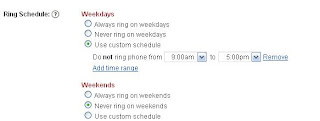
For this phone, I have the weekdays set to 9-5, and the weekends to not ring,
Now you simply would save and edit the other phone to only ring on weekends, by clicking "Always ring on weekends" and then clicking "Never ring on weekdays".
There you have it, a phone that rings only from 9-5 during the week only, and another that rings only on the weekends.
Let me know how you use Google Voice in the Comments.
Where do you go to that dictates what times certain phones will ring? I’m trying to figure that outLet's say you only want one phone to ring on the weekends and one to ring during the week, but only during the hours 9-5, how do you do that? Simple, use custom ring schedules.
Here's how:
1. Login to Google Voice
2. Click Settings
3. Click Phones
4. Click Edit on the phone you want to set a custom ring schedule for
5. Click Show Advanced Settings
As you can see, you can set the ring schedules to a particular time.

For this phone, I have the weekdays set to 9-5, and the weekends to not ring,
Now you simply would save and edit the other phone to only ring on weekends, by clicking "Always ring on weekends" and then clicking "Never ring on weekdays".
There you have it, a phone that rings only from 9-5 during the week only, and another that rings only on the weekends.
Let me know how you use Google Voice in the Comments.
Wednesday, August 5, 2009
All things Google: Google Voice
I have been using Google Voice for a couple weeks now, and the more I use it the more I like it,one HUGE benefit I see is that when I start getting spam calls from my google number you have the option of routing those calls to special "voicemail" I like to call it the trash.
Another great thing is I can use my Ipod Touch to send and receive messages (in wireless hotspots), which means no more typing using my cellphone (not a keyboard, lets just leave it at that).
So I've been trying to come up with some ideas, I realize now that if I can manage to mashup my Google Calendar (Birthday event reminders), and Google Voice, I can now send Happy Birthday Texts automatically, and send myself a reminder that I did so....how cool would that be.
For those of you wondering Google Voice is kinda like having a central call center (one number) that can route different kinds of calls to different places, very convienient.
On the plus side I had all my google contacts in order (because I lost my enV back in the winter snowboarding), and because the iPod Touch can sync with the contacts and calendar I was set when I signed up, so now it's a simple search for a contact, then click call or sms, and if you call, it will prompt you for which phone to call from, so what it will do is call your phone first, then start the ringing for the other phone (kinda like a "transfer"), SWEET.
Anyways, the more I play with Google Voice the more I like, I'll try to continue a review at some point in the future!
Biggest drawback though at this point is that GV won't accept MMS messages.
I'll update if that changes
Another great thing is I can use my Ipod Touch to send and receive messages (in wireless hotspots), which means no more typing using my cellphone (not a keyboard, lets just leave it at that).
So I've been trying to come up with some ideas, I realize now that if I can manage to mashup my Google Calendar (Birthday event reminders), and Google Voice, I can now send Happy Birthday Texts automatically, and send myself a reminder that I did so....how cool would that be.
For those of you wondering Google Voice is kinda like having a central call center (one number) that can route different kinds of calls to different places, very convienient.
On the plus side I had all my google contacts in order (because I lost my enV back in the winter snowboarding), and because the iPod Touch can sync with the contacts and calendar I was set when I signed up, so now it's a simple search for a contact, then click call or sms, and if you call, it will prompt you for which phone to call from, so what it will do is call your phone first, then start the ringing for the other phone (kinda like a "transfer"), SWEET.
Anyways, the more I play with Google Voice the more I like, I'll try to continue a review at some point in the future!
Biggest drawback though at this point is that GV won't accept MMS messages.
I'll update if that changes
Thursday, July 30, 2009
All Things Google: Google Business Cards
Well I logged into my Google Voice account yesterday and saw a bit of an advertisement about something to do with "Now you need Buisness cards" apparently the company iPrint is giving out 25 free business cards to Google voice customers, not sure how many customers will get this,
Anyone know what the wait time from requesting an invitation to getting an invite is at this point?
Let me know how you use Google Voice in your daily life!
EDIT: I got them and they're pretty cool looking, I'll post pics of the card when I get a chance!
Anyone know what the wait time from requesting an invitation to getting an invite is at this point?
Let me know how you use Google Voice in your daily life!
EDIT: I got them and they're pretty cool looking, I'll post pics of the card when I get a chance!
Subscribe to:
Posts (Atom)