My wife and a friend of mine civis_smith go hiking as many Saturdays as we can manage to stay motivated enough to do. While we hike my wife listens to music while we chat any and all subjects. One subject that comes up time and again is basically how can we stay motivated.
We constantly "claim" we LOVE to do a particular thing, but time and again we find that we manage to avoid that area not because we want to, but more out of pure laziness. It's alot easier to sit down and watch tv, or play guitar hero.
While we were talking about that I began to say some words that have come to haunt me, why is it I can play the EXACT same song on Guitar Hero OVER and OVER trying to become "perfect" at it, yet while studying for a class I do a problem, get it finished (right or wrong doesn't matter at this point) and I'm willing to say, "I did it once that's all I need to do", but why doesn't that hold true for Guitar Hero, I played song x once, that is all I need to do, but I don't I try and try to succeed more and more. I mean I can get a perfect on Guitar Hero and even at that point, rather then saying ok NOW I've managed to do it perfect, I say hmm...I wonder if I can do it 2 times, or heck, why not keep trying to do it until I get it perfect EVERY time.
Now Mr. Smith and I have begun to use Guitar Hero as a constant reminder to do what we love, and not to just stop after doing something once, but to keep doing it over and over until we can do it perfect, and if we've managed to do it perfect, shoot go for perfect EVERY time.
So my goal for this semester is not to submit to this laziness, but rather then thinking about things as "passive" and "active" barriers to what I want to do, I'm going to be proactive about everything, no more sitting around and saying ahhh I need to relax, fine I can relax but rather then relax doing something I many times have come to loathe, I will "relax" doing something I'm passionate about.
Let me know what keeps you out of ruts, and what keeps you reaching for your passion and never giving up, or even what your stumbling blocks are.
Sunday, August 23, 2009
Tuesday, August 18, 2009
Alarm Clock
I'm not sure how many people even use digital clocks in their room at night anymore to wake them up in the morning, with the advent of the alarm on the cell phone, but here goes, my wife has a digital alarm clock, and I can't stand the brightness at night.
I was thinking that it would be nice to be able to setup the alarm to shut off the display from time x to time y, with a button that you can hit to see the time (turns on the display), but basically the alarm would light up about 10 minutes before you have to get up, and then you will know what time it is,
Additionally, really do we need to know what time it is during the hours we're not at home? why not have the clock setup to shutdown or whatever until the time you get home, heck why not all appliances that can do it (obviously some like the fridge wouldn't work so well), but just have clocks that sync with network time (or something like that) and never have to set a clock again, and never have to see a clock at night again.
Shoot why not add wake on lan to all of them, then setup a website that will send a message to your clock, to turn on and then sound the alarm, there are probably tons of bad reasons why not to do this but ahhh whatever, anyways then if the lan is dead, then the clock just turns on (still keeps it's own time) and the last alarm set would be the new alarm..
I was thinking that it would be nice to be able to setup the alarm to shut off the display from time x to time y, with a button that you can hit to see the time (turns on the display), but basically the alarm would light up about 10 minutes before you have to get up, and then you will know what time it is,
Additionally, really do we need to know what time it is during the hours we're not at home? why not have the clock setup to shutdown or whatever until the time you get home, heck why not all appliances that can do it (obviously some like the fridge wouldn't work so well), but just have clocks that sync with network time (or something like that) and never have to set a clock again, and never have to see a clock at night again.
Shoot why not add wake on lan to all of them, then setup a website that will send a message to your clock, to turn on and then sound the alarm, there are probably tons of bad reasons why not to do this but ahhh whatever, anyways then if the lan is dead, then the clock just turns on (still keeps it's own time) and the last alarm set would be the new alarm..


Saturday, August 15, 2009
New Icon/Image
I created an image so I can point to it, so when someone saves my class search website to their home screen they'll see an icon rather then just a picture of the page, I use the idea from Scott Hanselman's blog
Here is my icon, I'm starting my business slowly, but hey who knows:

Let me know what you think of it, I just kinda threw it together kinda quickly.
If you have any ideas or want to send some submissions, send them to onaclov2000 at gmail dot com.
Thanks for checking it out, I'll post a few more if I think of any.
Here is my icon, I'm starting my business slowly, but hey who knows:

Let me know what you think of it, I just kinda threw it together kinda quickly.
If you have any ideas or want to send some submissions, send them to onaclov2000 at gmail dot com.
Thanks for checking it out, I'll post a few more if I think of any.
Friday, August 14, 2009
Mobility
With todays constant traveling as well as the number of computers the average developer/computer user has, I'm supprised we haven't found a better way to integrate multiple computers as one.
In comes Cloud Computing, where your software is all located in the cloud, that's fine and great but we're still in the old age of working on one computer at a time. Let's say you have a Desktop computer at home, a laptop computer, and a computer at work, now if all these computers can start working in unison, we can do things like tell the laptop to broadcast it's location to your desktop, and if your laptop leaves where the desktop is, have it ask you if you'd like to continue working on what you were, or simply allow that laptop to be an "extension" of your current computer desktop, and literally DRAG your program that you're currently using onto that desktop, now you already have your environment open running and no more "save, shutdown, open wait" business.
Since all the data is stored in the cloud (and I'll assume autosaving is occuring), simply treating each computer as an extension of another we can seamlessly move what we're working on from one computer to another.
So right now linux has the neat function of "multiple desktops" why not setup each desktop as a vnc or something connection, so if we say "send to desktop x" it literally moves the program off your computer (passes off the processing) and into the next desktop (aka computer), now you can access each desktop from each computer, and move from device to device.
Why would we want this, lets say I'm deep into a project and want to continue as I'm on my way to work (say I use the bus), so I drag the program to the new desktop and walk away, I could maybe have things setup to shut down (obviously completely customizable), now I'm on my way to work and keep working on the project, I get to work and transfer directly to my desktop and continue as I finish, now I don't have to worry about closing the program and keeping on re-opening (waiting for programs to load).
What would be interesting if is if processors would continue processing what they are able to, but search for other processors (not on their board), once they find one, they communicate and setup shared processing (heck why waste cycles), now that it's sharing the processing, moving a program from one desktop should be nothing to do.
In comes Cloud Computing, where your software is all located in the cloud, that's fine and great but we're still in the old age of working on one computer at a time. Let's say you have a Desktop computer at home, a laptop computer, and a computer at work, now if all these computers can start working in unison, we can do things like tell the laptop to broadcast it's location to your desktop, and if your laptop leaves where the desktop is, have it ask you if you'd like to continue working on what you were, or simply allow that laptop to be an "extension" of your current computer desktop, and literally DRAG your program that you're currently using onto that desktop, now you already have your environment open running and no more "save, shutdown, open wait" business.
Since all the data is stored in the cloud (and I'll assume autosaving is occuring), simply treating each computer as an extension of another we can seamlessly move what we're working on from one computer to another.
So right now linux has the neat function of "multiple desktops" why not setup each desktop as a vnc or something connection, so if we say "send to desktop x" it literally moves the program off your computer (passes off the processing) and into the next desktop (aka computer), now you can access each desktop from each computer, and move from device to device.
Why would we want this, lets say I'm deep into a project and want to continue as I'm on my way to work (say I use the bus), so I drag the program to the new desktop and walk away, I could maybe have things setup to shut down (obviously completely customizable), now I'm on my way to work and keep working on the project, I get to work and transfer directly to my desktop and continue as I finish, now I don't have to worry about closing the program and keeping on re-opening (waiting for programs to load).
What would be interesting if is if processors would continue processing what they are able to, but search for other processors (not on their board), once they find one, they communicate and setup shared processing (heck why waste cycles), now that it's sharing the processing, moving a program from one desktop should be nothing to do.
Wednesday, August 12, 2009
GV FAQ
I recently had a conversation with a couple people at various times asking me similar questions, so here are some of the common questions and answers, let me know if you ha ve any questions, I'll gladly post my answers.
Google checks to see if the number is a contact, if so it will stick
their name in the text otherwise they stick the number in the message, then send you the contents of the text message.
Unfortunately that appears to be the only way that it works as of this
point, so basically expect to get some crazy number, but it'll have the
person's name or number (depending on if they are a contact yet or not),
now when you respond, you simply respond to that number, (just by
hitting reply), once you've done that, I imagine google parses the
initial portion (containing name or number) and sends them a text
message from your google number (oddly enough)
So basically if you have their number in google contacts you'll know
who's contacting you, fortunately I was so worried about losing my phone
and contacts that I had already had my google contacts updated by the
time this came along, now apparently there is a way to upload the phone
book to google contacts (via CSV), and that being the case you can
export your phone's contacts via CSV, the only toughie, is converting
one to the other,You might be able to convert using perl or some such script and then all you have to do is upload it to google, and you're golden.
customers will see the google voice number come across, as far as
texting other people, unless you text them "through" your google voice
number, you are still literally using your number, it doesn't
automatically take your texts when you send them and send them through
GV.
The problem with "regular" phones, is if you want to call/text
someone through Google voice, using your phone (and not replying to a
text), you will have to call your google number (not sure how yet, I'll
have to look it up) then from there tell it who to call, so it's kinda a
pain unless you have a smart phone and can use an app, I.E. if you have
your ipod touch setup (jailbroken not that you would do that), you might be able to make that work, or Android and Blackberry already have apps in place.
What I've "been" doing is I'll go to the site and click call next to a
contact (or you can type in a number) then tell it which phone to ring,
then your phone will ring and then you will be connected with the
outgoing call to the number you wanted to call.
So what does that mean?
Basically if you don't have a smart phone, calling and texting (from
your phone) is a PIA, (except texts where you have already received one
on your phone), from the web interface it's pretty slick.
There are more I'm sure but this is a good start.
ve any questions, I'll gladly post my answers.I had my sister txt me at my GV number and it came up someSo here is the story, basically, the text message goes to google, then
wild number, with her number in the txt message itself. So....its like
I get a message from 405 xxx xxxx and I have no idea who it is. I named
it "google" just to see, and had my other sister txt me and it was a
different (but very similar) number. Is that how it works? I'm
guessing it goes through google, and google is actually the one txting
me correct? If so, how do you know who is txting you? There is no way
I am remembering everyones numbers.
Google checks to see if the number is a contact, if so it will stick
their name in the text otherwise they stick the number in the message, then send you the contents of the text message.
Unfortunately that appears to be the only way that it works as of this
point, so basically expect to get some crazy number, but it'll have the
person's name or number (depending on if they are a contact yet or not),
now when you respond, you simply respond to that number, (just by
hitting reply), once you've done that, I imagine google parses the
initial portion (containing name or number) and sends them a text
message from your google number (oddly enough)
So basically if you have their number in google contacts you'll know
who's contacting you, fortunately I was so worried about losing my phone
and contacts that I had already had my google contacts updated by the
time this came along, now apparently there is a way to upload the phone
book to google contacts (via CSV), and that being the case you can
export your phone's contacts via CSV, the only toughie, is converting
one to the other,You might be able to convert using perl or some such script and then all you have to do is upload it to google, and you're golden.
The other odd thing is, I haven't told anyone else this new number, andFrom the looks of things, google voice customers texting to other
I've been txting all kinds of people and no one has really said
anything...like "who is this" when they get my txt. As far as I know,
they don't see anything different - just like its txting from my regular
number. And on the google voice page there are only the conversations
ive had with you, and when I had my sisters txt me. I don't think that
you are in my contact list, and when you txt me it comes up as the new
number I put in your phone?
It seems it treats google voice members differently? So it does not
give me a random number with you, even though you are not in my
contacts.
customers will see the google voice number come across, as far as
texting other people, unless you text them "through" your google voice
number, you are still literally using your number, it doesn't
automatically take your texts when you send them and send them through
GV.
The problem with "regular" phones, is if you want to call/text
someone through Google voice, using your phone (and not replying to a
text), you will have to call your google number (not sure how yet, I'll
have to look it up) then from there tell it who to call, so it's kinda a
pain unless you have a smart phone and can use an app, I.E. if you have
your ipod touch setup (jailbroken not that you would do that), you might be able to make that work, or Android and Blackberry already have apps in place.
What I've "been" doing is I'll go to the site and click call next to a
contact (or you can type in a number) then tell it which phone to ring,
then your phone will ring and then you will be connected with the
outgoing call to the number you wanted to call.
So what does that mean?
Basically if you don't have a smart phone, calling and texting (from
your phone) is a PIA, (except texts where you have already received one
on your phone), from the web interface it's pretty slick.
Hmmm, it seems like most of this google voice thing is a pain in the assSo what is the benefit of a Google Voice number?
- and I don't really see where the benefit is. But its fun enough to
play around with though and txt people through the interwebs and they
won't know who it is.
- One phone number that you keep and you don't have to worry about "transferring" from carrier to carrier.
- Central number that can call any/all of your phones, much like calling a 1-800 number to get ahold of a company and then they route you through the system to the proper phone, you now have this ability, nice if you have co-workers, friends and family constantly calling you can route them, or setup call schedules for different phones (see call schedule post).
- I can't stand texting from my phone, but frequently have an internet connection so I can use the much nicer keyboard from my iPod or even my desktop to handle this cumbersome task (for my phone anyways)
- You get to pick your number, basically if you can think of one, try searching for it, and you can have it if you find it, most carriers just give you a choice of a couple numbers (terrible).
- Call Schedules.
- Voicemail transcription, It still needs work, but if it transcribes your messages close enough you can get a gist of it, and know if you really want to listen to that 2.5 minute VM, or have a good enough idea after a few words what it's all about.
- LOGS! I occasionally like to have record of conversations with people GV does this multiple ways, one you can record conversations (haven't tried this yet), SMS logs, and Voicemail logs, no more having to store your max text messages and deleting only one when you need to receive a new text, once you have your text at your phone, it's already logged in GV, also no more WAITING for your current carrier's VM system to give you all kinds of useless info wasting your time and more importantly your minutes.
- Telemarketer "spam" abilities. So if the only number you give out is your GV number, it doesn't matter if a telemarketer calls you, all you have to do is add them to your contacts (Say a SPAM contact) and setup the special routing of that one to go to a special voicemail that says "the number you are trying to reach is out of service", no more/ very little telemarketers from now on.
There are more I'm sure but this is a good start.
GV: How to Set Custom Ring Schedules
Someone sent me the following email:
Here's how:
1. Login to Google Voice
2. Click Settings
3. Click Phones
4. Click Edit on the phone you want to set a custom ring schedule for
5. Click Show Advanced Settings
As you can see, you can set the ring schedules to a particular time.
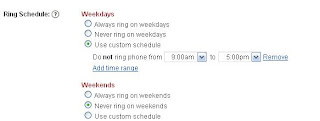
For this phone, I have the weekdays set to 9-5, and the weekends to not ring,
Now you simply would save and edit the other phone to only ring on weekends, by clicking "Always ring on weekends" and then clicking "Never ring on weekdays".
There you have it, a phone that rings only from 9-5 during the week only, and another that rings only on the weekends.
Let me know how you use Google Voice in the Comments.
Where do you go to that dictates what times certain phones will ring? I’m trying to figure that outLet's say you only want one phone to ring on the weekends and one to ring during the week, but only during the hours 9-5, how do you do that? Simple, use custom ring schedules.
Here's how:
1. Login to Google Voice
2. Click Settings
3. Click Phones
4. Click Edit on the phone you want to set a custom ring schedule for
5. Click Show Advanced Settings
As you can see, you can set the ring schedules to a particular time.

For this phone, I have the weekdays set to 9-5, and the weekends to not ring,
Now you simply would save and edit the other phone to only ring on weekends, by clicking "Always ring on weekends" and then clicking "Never ring on weekdays".
There you have it, a phone that rings only from 9-5 during the week only, and another that rings only on the weekends.
Let me know how you use Google Voice in the Comments.
Wednesday, August 5, 2009
All things Google: Google Voice
I have been using Google Voice for a couple weeks now, and the more I use it the more I like it,one HUGE benefit I see is that when I start getting spam calls from my google number you have the option of routing those calls to special "voicemail" I like to call it the trash.
Another great thing is I can use my Ipod Touch to send and receive messages (in wireless hotspots), which means no more typing using my cellphone (not a keyboard, lets just leave it at that).
So I've been trying to come up with some ideas, I realize now that if I can manage to mashup my Google Calendar (Birthday event reminders), and Google Voice, I can now send Happy Birthday Texts automatically, and send myself a reminder that I did so....how cool would that be.
For those of you wondering Google Voice is kinda like having a central call center (one number) that can route different kinds of calls to different places, very convienient.
On the plus side I had all my google contacts in order (because I lost my enV back in the winter snowboarding), and because the iPod Touch can sync with the contacts and calendar I was set when I signed up, so now it's a simple search for a contact, then click call or sms, and if you call, it will prompt you for which phone to call from, so what it will do is call your phone first, then start the ringing for the other phone (kinda like a "transfer"), SWEET.
Anyways, the more I play with Google Voice the more I like, I'll try to continue a review at some point in the future!
Biggest drawback though at this point is that GV won't accept MMS messages.
I'll update if that changes
Another great thing is I can use my Ipod Touch to send and receive messages (in wireless hotspots), which means no more typing using my cellphone (not a keyboard, lets just leave it at that).
So I've been trying to come up with some ideas, I realize now that if I can manage to mashup my Google Calendar (Birthday event reminders), and Google Voice, I can now send Happy Birthday Texts automatically, and send myself a reminder that I did so....how cool would that be.
For those of you wondering Google Voice is kinda like having a central call center (one number) that can route different kinds of calls to different places, very convienient.
On the plus side I had all my google contacts in order (because I lost my enV back in the winter snowboarding), and because the iPod Touch can sync with the contacts and calendar I was set when I signed up, so now it's a simple search for a contact, then click call or sms, and if you call, it will prompt you for which phone to call from, so what it will do is call your phone first, then start the ringing for the other phone (kinda like a "transfer"), SWEET.
Anyways, the more I play with Google Voice the more I like, I'll try to continue a review at some point in the future!
Biggest drawback though at this point is that GV won't accept MMS messages.
I'll update if that changes
Thursday, July 30, 2009
All Things Google: Google Business Cards
Well I logged into my Google Voice account yesterday and saw a bit of an advertisement about something to do with "Now you need Buisness cards" apparently the company iPrint is giving out 25 free business cards to Google voice customers, not sure how many customers will get this,
Anyone know what the wait time from requesting an invitation to getting an invite is at this point?
Let me know how you use Google Voice in your daily life!
EDIT: I got them and they're pretty cool looking, I'll post pics of the card when I get a chance!
Anyone know what the wait time from requesting an invitation to getting an invite is at this point?
Let me know how you use Google Voice in your daily life!
EDIT: I got them and they're pretty cool looking, I'll post pics of the card when I get a chance!
Class Search
I have been mulling over the idea of trying to improve the class search process where I go to school, I currently work a full time job, and am trying to go to school. Needless to say trying to schedule classes and work hours can be a bit of a bear.
Along came the idea of "class search", I'll give you a bit of a hint of what it's got, and as I continue working on it I'll bring it up a little more.
Right now my goal is to have a particular user login, and once they're logged in it will display classes that are relevant to their particular declared degree. The basic site I've currently made is an Comp Engineering Major related list of classes.
There are alot of "enhancements" that I am working on and have ideas for quite a few more.
You can check out the "mobile" version (updated most recently) here
If anyone knows any good "how to's" on using Google Calendar on their site, let me know!
Hope you like it.
Along came the idea of "class search", I'll give you a bit of a hint of what it's got, and as I continue working on it I'll bring it up a little more.
Right now my goal is to have a particular user login, and once they're logged in it will display classes that are relevant to their particular declared degree. The basic site I've currently made is an Comp Engineering Major related list of classes.
There are alot of "enhancements" that I am working on and have ideas for quite a few more.
You can check out the "mobile" version (updated most recently) here
If anyone knows any good "how to's" on using Google Calendar on their site, let me know!
Hope you like it.
Tuesday, July 28, 2009
Circuit Analysis II Lecture 22
Disclaimer: This series of posts is to serve as notes for myself as well as any others interested in the subject of Circuit Analysis II. This is the course ECE 213 at UNM.The course will follow the book:
Electric Circuits (8th Edition)

Final Review:
Solve for power across the resistor.
You are given the equation:
ak = (vm/k(pi))sin(k(pi)/2) and bk = (vm/k(pi))(1-cos(k(pi)/2))
When looking at k = 3 (Third harmonic) we find that the a3 and b3 will come out to -vm/3(pi) and positive
So for example when vm = 1 and RL = 15ohms
We can get An by just taking the co-efficients of the cos and sin from above and solve the equation .5 * An2/RL
We can plug into the equation:
(((1/3(pi)2 + 1/3(pi)2).5)2)/30
Solving that equation we get .75mW (since we're looking for power)
Now this method only works if we're looking for the power across a resistor on our output.
Also from the last quiz we were trying to decide what to do with 21.99 well converting to s domain and whatnot we basically get A from A|H(jw)|cos(wt+phi)
so plugging in 0 (where w = 0) into H(0j) we get 4/5 so since cos(0) = 1 we get A*4/5 which ends up being around 17.something
Good luck on the final!
Start at the beginning Lecture 1 6/8/09
Learning Ada
I'm getting the opportunity to do some work in ada so I'll note some things I've learned as I go along, they may be common knowledge to some people, but they're new to me as I am learning.
Yesterday I learned how to declare a record and how to assign values to the items in the record, there are 2 ways (that I currently know of).
Pertaining to a record that contains the items animal and fish:
1. Assign individually:
Albuquerque.animal := ("cow");
Albuquerque.fish := ("trout");
2. Assign them as a group:
Albuquerque := (animal => "cow", fish => "trout");
Yesterday I learned how to declare a record and how to assign values to the items in the record, there are 2 ways (that I currently know of).
Pertaining to a record that contains the items animal and fish:
1. Assign individually:
Albuquerque.animal := ("cow");
Albuquerque.fish := ("trout");
2. Assign them as a group:
Albuquerque := (animal => "cow", fish => "trout");
Circuit Analysis II
I'll will be adding a small synopsis in the future.
Electronic Circuits 8th Edition
Lecture 1 6/8/09
Lecture 2 6/09/09
Lecture 3 6/10/09
Lecture 4 6/11/09
Lecture 5 6/22/09
Lecture 6 6/23/09
Lecture 7 6/24/09
Lecture 8 6/29/09
Lecture 9 6/30/09
Lecture 10 7/1/2009
Lecture 14 7/9/2009
Lecture 15 7/13/2009
Lecture 22 7/28/2009
Electronic Circuits 8th Edition
Lecture 1 6/8/09
Lecture 2 6/09/09
Lecture 3 6/10/09
Lecture 4 6/11/09
Lecture 5 6/22/09
Lecture 6 6/23/09
Lecture 7 6/24/09
Lecture 8 6/29/09
Lecture 9 6/30/09
Lecture 10 7/1/2009
Lecture 14 7/9/2009
Lecture 15 7/13/2009
Lecture 22 7/28/2009
Tuesday, July 21, 2009
Digging into New Code
 One of the biggest challenges in learning a new system is trying to get a picture of that new system as a whole.
Right now I'm trying to learn a pretty complex system, one of the big challenges is that there are so many SLOC that simply opening a file and poking around won't do you any good.
So the question becomes this:
How does one become knowledgeable on a particular system and how do they find that starting point?I think this question applies to projects big and small. If you don't know where to start, you will continually find yourself asking the more experienced programmers where to begin.You might even be able to modify small portions of code to do what you want and that works as long as those developers are there to point you in the direction, but when the time comes (and it will) that they aren't there, you have to be able to figure it out yourself.
So back to our question, HOW do you do that.
Of course the simple answer is start at the beginning and READ the code as it progresses, and that is an acceptable answer in a lot of situations.
In other situations it's not so easy, some systems are real time embedded systems, so you'll then have to figure out when you enter your frame again, do you start at the beginning, where you left off, or in a predetermined location?
Here's some questions to ask yourself when you are just starting to look at an entire system:
- Where do you start and can your program be interrupted,
- If your program can be interrupted, how is it handled, like I mention above where does it start again when it's given control again.
- What is your program trying to accomplish in this section of code that you're reading
- How does it pertain to the project as a whole.
- Can you break the code into groups, I.E.
- If your project is a car, can you break it into sections such as brakes, engine, steering?
- Create a list of all pieces (if possible) that make up each group.
- Look at how they each contribute to the whole.
- Does each group interact with another group directly or is there a common group that handles all requests to each group?
- Make a web chart that connects each group and primary methods of communication between each of them.
- Make a web chart that connects each group and primary methods of communication between each of them.
All Things Google: Google Voice
I got a Google Voice Invite over the weekend, so I setup my google number and whatnot, it was pretty easy, I did have some problems, I tried calling my mom through the interface, what was supposed to happen is it was supposed to call my cell phone (I had selected), then from there it was supposed to connect me to a call ringing to my mom.
Unfortunately, I ended up with a voicemail of a phone ringing, and my mom didn't recognize the number so she didn't answer....
It did have my google contacts which is nice, I tried SMS'ing my cell from their interface and it appeared to work fine.
I'm not sure how I feel about calling into a phone number then having that phone dial out to another number, if there was a way to make it more seamless as far as the outgoing calls I might like it more.
For now I'm going to stick to YouMail for my voicemail provider (at the moment). The nice thing about YouMail is that I don't have to change my number.
Once Google integrates things better I could see myself using this more, I know they have an app out there for the G1 that will use your default contacts list, and then from there you can just make calls directly, but I am currently without a google phone, so unless they find a way to make this app work more seamlessly with more phones it's in the "Its cool and I might poke at it a bit but I probably won't use it steadily until it's got more usability"
Let me know if you got an invite and what you think of Google Voice!
Once you've got your one phone number for "life" might be a good idea to get some Google Business Cards
Unfortunately, I ended up with a voicemail of a phone ringing, and my mom didn't recognize the number so she didn't answer....
It did have my google contacts which is nice, I tried SMS'ing my cell from their interface and it appeared to work fine.
I'm not sure how I feel about calling into a phone number then having that phone dial out to another number, if there was a way to make it more seamless as far as the outgoing calls I might like it more.
For now I'm going to stick to YouMail for my voicemail provider (at the moment). The nice thing about YouMail is that I don't have to change my number.
Once Google integrates things better I could see myself using this more, I know they have an app out there for the G1 that will use your default contacts list, and then from there you can just make calls directly, but I am currently without a google phone, so unless they find a way to make this app work more seamlessly with more phones it's in the "Its cool and I might poke at it a bit but I probably won't use it steadily until it's got more usability"
Let me know if you got an invite and what you think of Google Voice!
Once you've got your one phone number for "life" might be a good idea to get some Google Business Cards
Wednesday, July 15, 2009
Open Forum
Anyone have any questions or topics they'd like to hear about?
I'm all ears, I would definately like to keep it Tech oriented but if you have any questions, now's the time to ask, I'll try to do at least one of these a week (or possibly one every other week, we'll see the response to this one).
Leave your questions in the comments.
Thank you,
onaclov
I'm all ears, I would definately like to keep it Tech oriented but if you have any questions, now's the time to ask, I'll try to do at least one of these a week (or possibly one every other week, we'll see the response to this one).
Leave your questions in the comments.
Thank you,
onaclov
Tuesday, July 14, 2009
Circuit Analysis II Lecture 15
Disclaimer: This series of posts is to serve as notes for myself as well as any others interested in the subject of Circuit Analysis II. This is the course ECE 213 at UNM.The course will follow the book:
Electric Circuits (8th Edition)
Ch 14
Low pass filters
High pass filters
Band pass filters
A simple circuit with a resistor and inductor in series across a voltage source.
HL(s) = VoL/V(s) = sL/r+sL
re-writing it with some manipulation we get:
s/(s+(R/L))
Something to note is that wc = R/L (wc is the cutoff frequency)
so for HR(s) = VoR/V(s) = R/R+SL = (R/L)/(s+(R/L))
So what does this mean?
Substituting in wc in the equations we'll get:
HR(s) = wc/s+wc
HL(s) = s/s+wc
Looking at the graph for HR(s) we have a graph that starts at 1 at w/wc and it slopes down acting similar to a 1/x graph.
Turns out this is a low pass filter.
wc is our cutoff, and for wc>x it's passed through
So it turns out if you look at HL(s) it's a High pass filter.
Now if you look at a RC circuit it turns out that the values flip, what that means is that the filter across the capacitor would be a low pass filter, and across the resistor is a high pass.
Problem 14.3
P582
So in order to find this we just need to know R and L, since we do we can determine that it's 5k/3.5*10-3 = 1.43Mrads/s
Finally we took a RLC circuit and determined that because of the L and the C in series we were able to determine that it was a bandpass filter because there was more or less a range of frequencies that were aloud to pass through or block.
Finally we went over the solution for 13.71, I plan to post the answers to 13.71, 9.30a and 9.31 once I've solved them so stay tuned.
HW:
AP 14.1, 14.2a,b
Ex 14.1-5, 14.8
p 14.1a, 2, 5, 10-12, 14,19, 20
Good luck
Continue on to Lecture 22 7/28/2009
All Things Google: Gmail
Ok so I was going to tell one of my buddies to check out gmail because he's using a email provided with his ISP. If you get an email account with another non ISP affiliated account you have one email....and that's it.
The interesting thing to note is that I sent him an "invite" and now I show one less invite left.
Which brings me to my question...Do you have to have an invite to sign up for GMAIL, and if not what is the point of having the invites still or at least having the counter? what happens if you run out, you can't tell anyone about Gmail anymore?
Let me know if you signed up for Gmail without an invite, or if you have any clue why they do this?
Edit:
After going to Gmail and searching a bit I found this comment:
If you run out of invitations, they'll be replenished over time.
Still not sure why they even have a counter anymore if that's the case, maybe someone knows...if I figure it out, I'll let you guys know.
The interesting thing to note is that I sent him an "invite" and now I show one less invite left.
Which brings me to my question...Do you have to have an invite to sign up for GMAIL, and if not what is the point of having the invites still or at least having the counter? what happens if you run out, you can't tell anyone about Gmail anymore?
Let me know if you signed up for Gmail without an invite, or if you have any clue why they do this?
Edit:
After going to Gmail and searching a bit I found this comment:
If you run out of invitations, they'll be replenished over time.
Still not sure why they even have a counter anymore if that's the case, maybe someone knows...if I figure it out, I'll let you guys know.
Sunday, July 12, 2009
Circuit Analysis II Lecture 14
Disclaimer: This series of posts is to serve as notes for myself as well as any others interested in the subject of Circuit Analysis II. This is the course ECE 213 at UNM.The course will follow the book:
Electric Circuits (8th Edition)
Requested to make sure we ABSOLUTELY DID (or at least tried):
Problems 13.7, 9.30a, 9.31
We also got our test back.
That's all!
Continue on to Lecture 15 7/13/2009
Circuit Analysis II Lecture 10
Disclaimer: This series of posts is to serve as notes for myself as well as any others interested in the subject of Circuit Analysis II. This is the course ECE 213 at UNM.The course will follow the book:
Electric Circuits (8th Edition)
1. Complex Numbers
2. Repeated Roots
The test was moved to Monday (a little late notice I know)
Looking at this equation (13.59 from page 520):
Il = 6s/(s+5000)2
using Partial Fraction Decomposition we were able to obtain k1
k1 = 6s/(s+5000)2 evaluating s at -5000
we treat this equation pretty much like this:
k1 = 6s/((s+5000)2)*1
so when we evaluate we would use the equation:
k1 = 6s/1
so subbing s=-5000 we get:
k1 = -30,000
Then we take the derivative of k2
k2 = d/ds 6s/1 = 6
this gives us
-30000/(s+5000)2 + 6/(s+5000)
converting back to time domain we get:
(-30000te-5000t + 6e-5000)u(t) A
Next up is problem 13.49
We are trying to find the vo/vi combo of the circuits.
a) First up we manage to get the equation:
vo = vi/((1.25*106/s) + 25000) * 1.25*106/s
a little algebra we get:
vo = 1.25*106vi/s((1.25*106/s) + 25000)
a little more we get:
vo = 1.25*106vi/(1.25*106 + 25000s)
pulling out the 25000 we get:
vo = 50vi/(s+50)
finally we get:
vo/vi = 50/(s+50)
b) Combining things we get the equation:
vo = vi/((1.25*106/s) + 25000) * 25000
A tad more algebra we get:
vo = svi/(s+50)
and finally we get:
vo/vi = s/(s+50)
e) This one requires using an additional technique the teacher used node voltage:
(vo - vi / 25k) + (vo/100k) + (vo/2.5*106/s) = 0
A little algebra later (multiplying by 2.5*106) we get:
100(vo - vi) + 25vo + svo = 0
Re-arranging and whatnot we get:
(125+s)vo = 100vi
Finally we end up with:
vo/vi =100/(s+125)
Last we worked with ap 13.11a&b
using the equation from 13.11a that's our transfer function:
H(s) = 9600s/s2 + 140s + 62500
For part b we are supposed to look at the unit step (which is 1/s):
so subbing that in we get the equation:
vo/(1/s) = 9600s/s2+140s+62500
moving things around a bit we get:
vo = 9600s/s(s2+140s+62500)
cancelling things we get:
vo = 9600/s2+140s+62500
and finally breaking it up by completing the square:
vo = 9600/(s+70)2-4.9*103+62500
combining the rest and separating the top to look like something from the table we get:
vo = 240 * 40/(s+70)2+2402
And lastly converting to the time domain we get:
40e-70tsin(240t)
Continue on to Lecture 14 7/9/2009
Friday, July 10, 2009
Live Android CD
I'm working on learning the java language so I can develop apps for the G1, so far I have only managed to run the hello world, from a tutorial (not much time for learning the java language yet), so far its an interesting project. I hope to build some posts around what I learn.
I came across the below link talking about some users of the Google Code Community porting a version of the Android OS to a Live CD that you can run to on your desktop.
It looks quite interesting and I'm going to give it a try, now it looks like there are 3 options for downloading,
1. Torrent
2. 2 Part ISO (Not sure how that works)
3. 3 Part Rar file.
(download page link: download)
I'm probably going to give the torrent one a whirl and I'll give it a review in the near future.
Check out the main site link here:
Live Android
I came across the below link talking about some users of the Google Code Community porting a version of the Android OS to a Live CD that you can run to on your desktop.
It looks quite interesting and I'm going to give it a try, now it looks like there are 3 options for downloading,
1. Torrent
2. 2 Part ISO (Not sure how that works)
3. 3 Part Rar file.
(download page link: download)
I'm probably going to give the torrent one a whirl and I'll give it a review in the near future.
Check out the main site link here:
Live Android
Subscribe to:
Posts (Atom)