Friday, June 28, 2013
Back in the Day.


Tuesday, June 11, 2013
Delete Site on Admob
If you develop apps and use Admob, sometimes you might make a test "site", I was having trouble finding how to get rid of a test site. I thought I read there was a max admob site count, so I wanted to remove any misc, so I'll be able to use my max amount (whether I'll ever hit that or not, is another question).
Steps:
Steps:
- Login
- Click Sites & Apps heading (mine shows up there by default so no click necessary)
- Hover over the site you wish to get rid of.
- Click Manage Settings.
- Next to the title of your app, click edit.
- Navigate to the section near the bottom titled Delete Site.
- Click Delete Site.
Friday, May 24, 2013
Tip Calculator
In keeping with the madness I've written a tip calculator this week.
https://play.google.com/store/apps/details?id=com.onaclovtech.tipcalculator
Temperature converter
So I started out doing a simple converter for Celsius, Kelvin, and Fahrenheit, found a Wikipedia entry, kinda went overboard, now there are a ton of conversions, and the best part is they're simple to do, just drag the slider.
https://play.google.com/store/apps/details?id=com.onaclovtech.temperatureconverter
Wednesday, May 22, 2013
Percent Off
Percent off is my latest app, figure I'll go for breadth in the app store, not depth...lol
https://play.google.com/store/apps/details?id=com.onaclovtech.percentoff
Friday, May 17, 2013
Simple Perl Actions Template
I wrote a simple template (runnable) that goes over some actions I commonly use in my perl scripts I write at home and work. Check it out below:
Let me know if there are any other simple templates you'd like to see!
Wednesday, May 15, 2013
Project Idea: Self Learning Samba System
Self learning Samba configuration. Tools which you include on client and server. Server steps through each set of settings, then spans the client to download files (or upload). Checks times that it takes to do such tasks. Finds the most efficient (fastest) speeds and bam. Best scenario.
Anyone want to do build something like this for the betterment of mankind? (yea, 1st world problem right?)
Anyone want to do build something like this for the betterment of mankind? (yea, 1st world problem right?)
Thursday, April 18, 2013
Language Wishlist
I have a wishlist, I came across today of a few things I would really like the language that I would love to write to be able to do.
Write a foreach loop and use the syntax below (basically perl but a little weird looking)
foreach, ,... (@variablearray1, @variablearray2,... @variablearrayn)
{
So I can loop through multiple arrays in the same iteration and not have to have arrays of arrays or other crazy stuff.
}
Also I would like to be able to pick a "random order" of ALL of the arrays, but the indexes are linked, I.E.
@array1 = lah,bl,a,we
@array2 = 1,2,3,4
I would love to see a "random function" or keyword, I can use that will rearrange it to something like this:
@array1 = bl, we, a, lah
@array2 = 2,4,3,1
(basically the original indices stay matched).
Now of course I could write a tool which will do the second one. and I could write a "templating language" which would essentially replace,... with $variablearray1[$i] and the foreach to a for loop but well that's annoying I....maybe one day I will...we'll see.
Write a foreach loop and use the syntax below (basically perl but a little weird looking)
foreach
{
So I can loop through multiple arrays in the same iteration and not have to have arrays of arrays or other crazy stuff.
}
Also I would like to be able to pick a "random order" of ALL of the arrays, but the indexes are linked, I.E.
@array1 = lah,bl,a,we
@array2 = 1,2,3,4
I would love to see a "random function" or keyword, I can use that will rearrange it to something like this:
@array1 = bl, we, a, lah
@array2 = 2,4,3,1
(basically the original indices stay matched).
Now of course I could write a tool which will do the second one. and I could write a "templating language" which would essentially replace
Saturday, February 23, 2013
Twitter the next text messaging app?
I was reading a tweet by @haacked and came to a realization, not sure if he has realized it but using twitter as your text messaging is brilliant.....
Phil Haack (haacked):
If you are with @shiftkey tell him we're waiting for him outside the lobby of the Hyatt by the valet!
Here's why:
Suppose @shiftkey doesn't check his messages often, but his buddies with him do, if they follow haacked they may see that message and relay it to him, its like being able to get someone's attention without having to explicitly text him and friends, one message and you're done. I really like the idea, my only issue with twitter still is privacy, of course I've heard rumors of people tracking others inline presence to determine if they're home or not (for nefarious purposes) aside from that hiccup its a really useful tool for that. Of course if you don't know shiftkey and you most definitely aren't at the hotel this is just noise, which makes me wonder, would location aware tweets make sense? You only see a tweet like that if you're within x miles of said location/person?
Just some thoughts!
Tuesday, February 19, 2013
Speed up Eclipse in Ubuntu
In an effort to keep old hardware running trying to build Android Apps, I was really looking for a way to speed up eclipse. The best improvement I've found is to run using the Sun (Oracle) JDK, it's impressively faster, but for some reason or another you can't just apt-get it anymore.
I found a github site https://github.com/flexiondotorg/oab-java6.git that handles that, however it required a few extra steps, so I just made a quick script for it.
I'm sure there are some parameters that can be added so you don't have to keep adding yes to things, but this was a quick and easy with minimal monitoring, if you make an update (just fork the gist), then let me know and I'll include it here.
Here is the gist:
I found a github site https://github.com/flexiondotorg/oab-java6.git that handles that, however it required a few extra steps, so I just made a quick script for it.
I'm sure there are some parameters that can be added so you don't have to keep adding yes to things, but this was a quick and easy with minimal monitoring, if you make an update (just fork the gist), then let me know and I'll include it here.
Here is the gist:
Sunday, February 10, 2013
Ripping DVD's in Ubuntu 12.04 -- Handbrake
It took me a little while to figure it out, but these are the steps I use to setup a fresh install of Ubuntu with the necessary software to rip dvd's.
Let me know if you have any additional tips and/or tricks to install that will setup everything!
Let me know if you have any additional tips and/or tricks to install that will setup everything!
Roku SSDP nodejs
I tried using the SSDP to find the roku ip address using ncat as recommended by Roku, but using wireshark to moitor it just didn't seem to be working.
In Ubuntu using sudo wireshark brings up the app, selecting your network interface under filter type in udp.dstport == 1900 and click apply, I was seeing my router and the roku box notifying the 239.255.255.250 ip of their ip addresses, but I wasn't seeing the "M-SEARCH * HTTP/1.1 showing up.
I wanted a nodejs solution so I tried searching for that, hoping that might change things up, I found this:
However placing the roku parameters ST: just wasn't working"roku:ecp", I did notice in the notify from the box that it was using MX as 2, so I tried updating that, however still no luck. After consulting nodejs.org I discovered the optional call back and in their example they close the connection when the call is completed. So I made the update to the following.
It appears that the program was closing the client connection before the message was sent out (and a response occurs), so once I put in the callback to close it, I got a response. Hope that helps anyone else who wants to use SSDP.
Check out the Roku Remote nodejs module I am working on.
However placing the roku parameters ST: just wasn't working"roku:ecp", I did notice in the notify from the box that it was using MX as 2, so I tried updating that, however still no luck. After consulting nodejs.org I discovered the optional call back and in their example they close the connection when the call is completed. So I made the update to the following.
It appears that the program was closing the client connection before the message was sent out (and a response occurs), so once I put in the callback to close it, I got a response. Hope that helps anyone else who wants to use SSDP.
Check out the Roku Remote nodejs module I am working on.
Friday, February 1, 2013
Music Glove Explained
I realize (thanks to a twitter follower) that I never really explained how my music glove actually works.
(Introducing Proof of Concept Music Glove)
Here goes.
The glove connects to the arduino over I/O. (basically just use some I/O pins to read a pressed state).
I wrote some code (referenced by this post: ) to transmit over the arduino's RS232 (Serial) port. The RN-42 uses RS232 to communicate to the device, so as long as the baud rate, etc are the same, then sending data from the Arduino to the RN-42 is a breeze.
Next we need a way to read the data. Download the bluetooth chat application from google (located here: ), modify it where the line says
Next I added some code to read received data.
The receive message section should look something like this:
Changing Volume, songs, etc, are all located in the following function I stuffed in there.
Of course you need a preferences to deal with things but you don't have to, you can simply just say if you see A, then do the action listed for the one you want in the above code.
Put it all together and you have a device which will change the volume or songs (if you set it up via preferences). Remember that some of the options are not publicly declared intents so they work right now, but may change in the future. If you have further questions go ahead and leave a comment, or find me on twitter @onaclov2000.
(Introducing Proof of Concept Music Glove)
Here goes.
The glove connects to the arduino over I/O. (basically just use some I/O pins to read a pressed state).
I wrote some code (referenced by this post: ) to transmit over the arduino's RS232 (Serial) port. The RN-42 uses RS232 to communicate to the device, so as long as the baud rate, etc are the same, then sending data from the Arduino to the RN-42 is a breeze.
Next we need a way to read the data. Download the bluetooth chat application from google (located here: ), modify it where the line says
Next I added some code to read received data.
The receive message section should look something like this:
Changing Volume, songs, etc, are all located in the following function I stuffed in there.
Of course you need a preferences to deal with things but you don't have to, you can simply just say if you see A, then do the action listed for the one you want in the above code.
Put it all together and you have a device which will change the volume or songs (if you set it up via preferences). Remember that some of the options are not publicly declared intents so they work right now, but may change in the future. If you have further questions go ahead and leave a comment, or find me on twitter @onaclov2000.
Thursday, January 31, 2013
Using Nodejs as a fileserver
Creating a Simple Fileserver.
Tip #2
I wanted a simple fileserver, I tried looking for a variety of search terms, but finally came upon simple file server. I came across the post linked by Tip #2 above, but it wasn't exactly clear what it was doing exactly.
The documentation isn't 100% clear so I played with it a little, (and added some comments to one of the posters).
I used connect.
Install it with npm connect.
Next use the following code:
.use(connect.static('pathyouwishtoserve')) tells the server where to look for files.
var connect = require('connect'),
http = require('http');
connect()
.use(connect.static('pathyouwishtoserve'))
.use(connect.directory('pathyouwishtoserve'))
.listen(8080);
.use(connect.directory('pathyouwishtoserve')) tells the server to return the following directories contents.
If you now navigate to http://your-ip-address:3000 you'll get a list of the directory contents,
if you add a /filename to that path you'll get the file.
I'll be posting tips as I come across them of using NodeJS as an intranet fileserver.
Long story short, I want to build a Roku app that will refer to the NodeJS server for where to find the files. I figure it'll be simpler than PLEX, and also faster (I'm hoping). Once I get the stuff running I'll plan on running it on my Pogo Plug as a media server for my Roku, totally awesome!
Tuesday, January 29, 2013
Creating a Kindle EBook Part 1
It's not quite that simple these days. When you send that zipped file out to your kindle, amazon splits it up and you get each item pushed to your device, so if you have 3 pictures, you have 3 pictures plus your html ebook.
The fix for that is to create a .mobi file, now there are some sites that do that, also the program Calibre works, but for now I decided to try using Amazon's solution. Kindlegen
I use ubuntu so I'll be giving the ubuntu version, if you want an example in the Windows version, then let me know, and I'll try to update for that!
Here goes.
I found this little trick out, create a file called kindlegen located at /usr/local/bin
enter in the following (I had to use sudo):
#!/bin/bashafterwords use the following command
exec/kindlegen "$@"
:/>sudo chmod -x /usr/local/bin/kindlegen
Now whenever you want to convert an html file, simply call kindlegen
Lets make a book.
First lets try the following
Based on the website I mentioned at the top they suggest naming things page_nn.jpg, etc, however as long as you keep track, it doesn't really matter the naming (it's for simplicities sake).
This particular book has 3 pages. Duplicate the following lines for each page, and you're set.
Save your file as test.html (or whatever you want, just substitute your filename below)
Next we'll actually create our Mobi File.
Navigate to the folder via commandline:
:/>kindlegen test.html
The resulting file will be called test.mobi
Next login to your amazon account check your account settings and scroll down to manage your kindle.
Click Manage Devices
Here you can find your email address to send your mobi file.
Next email your .mobi file to that email address.
When you see the file visible on the Personal Documents Section. Check your kindle and see if the file has arrived. If not, you can "resend" it using the Personal Documents Section.
Good luck!
Sunday, January 27, 2013
Using NodeJS as an Intranet Webserver
I'll be posting tips as I come across them of using NodeJS as an intranet webserver.
Long story short, I want to build a Roku app that will refer to the NodeJS server for where to find the files. I figure it'll be simpler than PLEX, and also faster (I'm hoping). Once I get the stuff running I'll plan on running it on my Pogo Plug as a media server for my Roku, totally awesome!
Tip #1
When running a http://nodejs.org/ port, the IP address should be of the machine you are currently on. I chose the port 8080 as it's the standard http port.
From linux you can find this by doing a simple ifconfig command on the command line. From windows ipconfig should do it.
Then using the example below: (from the NodeJS website)
So when you go to another machine such as your phone and access the page 100.11.1.6 you should get "Hello World". When you're able to do this, your Roku can now see the server (when you have the app setup).
The above tip was discovered after a google search to figure out an error. The link is from stackoverflow, and can be clicked above on the Tip #1 link.
Long story short, I want to build a Roku app that will refer to the NodeJS server for where to find the files. I figure it'll be simpler than PLEX, and also faster (I'm hoping). Once I get the stuff running I'll plan on running it on my Pogo Plug as a media server for my Roku, totally awesome!
Tip #1
When running a http://nodejs.org/ port, the IP address should be of the machine you are currently on. I chose the port 8080 as it's the standard http port.
From linux you can find this by doing a simple ifconfig command on the command line. From windows ipconfig should do it.
Then using the example below: (from the NodeJS website)
var http = require('http');
http.createServer(function (req, res) {
res.writeHead(200, {'Content-Type': 'text/plain'});
res.end('Hello World\n');
}).listen(8080, '100.11.1.6');
console.log('Server running at http://100.11.1.6:8080/');
So when you go to another machine such as your phone and access the page 100.11.1.6 you should get "Hello World". When you're able to do this, your Roku can now see the server (when you have the app setup).
The above tip was discovered after a google search to figure out an error. The link is from stackoverflow, and can be clicked above on the Tip #1 link.
Friday, December 28, 2012
How to quickly build amazon affiliate links on an android device.
Mobile
Social
The App
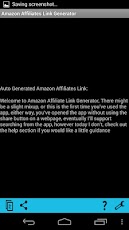
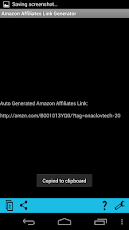
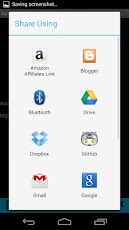
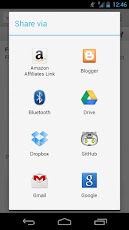
This app makes creating links trivial. I wanted the interface to be as simple as possible. There are only 4 buttons (possibly a 5th someday) from left to right, copy, share, help, settings).
Download Amazon Affiliates Link Generator.
Download Amazon Affiliates Link Generator.
How
Easy as pie!
Ads

Tuesday, November 27, 2012
Syncing Picasa
Anyone here have a Google Picasa account? How about 2? (I'm thinking families here) More?
Sure someone can share an album with you, but if you want to view it, you have to find the link, until google allows shared albums to be visible in your account (and indirectly visible via your Android phone). You'll have to just deal with it.
I got tired of dealing with it, I started working on a project, right now it does a one way "copy" from one account to another, I have plans to finalize the checks that compare the folders (albums) and determine what differences exist, and move photos back and forth to sync them.
My current implementation runs from a python script, and you have to have the Google API's loaded. This is great for those cases where you only need to sync once. However I want to sync say, once a day. Using this locally would require my computer to be running, what if my other family members wanted to sync albums with eachother? Now we have multiple instances.
Eventually I would like to set this up to run on Google's App Engine on a daily or more frequent rate, however oddly enough, their API's are not as clearly available via App engine.
On a positive note, I hadn't really done much programming in Python prior to this project, now I've begun, I don't mind it as bad as I originally had (don't get me started on the whole whitespace thing).
If you're interested in what I'm working on and would like to poke around, follow along, (or maybe help) you're welcome to check out the repository located on GitHub.
I'll keep you updated as I move along with this project.
https://github.com/onaclov2000/PicasaSync
Sure someone can share an album with you, but if you want to view it, you have to find the link, until google allows shared albums to be visible in your account (and indirectly visible via your Android phone). You'll have to just deal with it.
I got tired of dealing with it, I started working on a project, right now it does a one way "copy" from one account to another, I have plans to finalize the checks that compare the folders (albums) and determine what differences exist, and move photos back and forth to sync them.
My current implementation runs from a python script, and you have to have the Google API's loaded. This is great for those cases where you only need to sync once. However I want to sync say, once a day. Using this locally would require my computer to be running, what if my other family members wanted to sync albums with eachother? Now we have multiple instances.
Eventually I would like to set this up to run on Google's App Engine on a daily or more frequent rate, however oddly enough, their API's are not as clearly available via App engine.
On a positive note, I hadn't really done much programming in Python prior to this project, now I've begun, I don't mind it as bad as I originally had (don't get me started on the whole whitespace thing).
If you're interested in what I'm working on and would like to poke around, follow along, (or maybe help) you're welcome to check out the repository located on GitHub.
I'll keep you updated as I move along with this project.
https://github.com/onaclov2000/PicasaSync
Wednesday, November 14, 2012
Introducing Geek Book Club
If you know me personally you probably have heard of "Geek Book Club", basically we are a group of people interested in learning more technical things. Some work in technical jobs where we don't feel like we're learning enough new techniques to really make us valuable, and some don't work in technical jobs but find it interesting. Either way we're all here to learn.
I recently created a repo on GITHUB, so check it out.
https://github.com/onaclov2000/GeekBookClub
Thank you,
Tyson
I recently created a repo on GITHUB, so check it out.
https://github.com/onaclov2000/GeekBookClub
Thank you,
Tyson
Tuesday, October 16, 2012
Unit Testing with Structural Coverage
I don't love spending time testing, so I try to make the best use of my time. I write Unit Tests when I can, and automate any other testing if possible. Sometimes I try to even make writing tests easier on myself by using some techniques I picked up from The Pragmatic Programmer: From Journeyman to Master

Side Note: If you haven't read this book, stop what you're doing, go buy it, rent it from a library, borrow it from a friend I don't care, READ IT, LEARN IT. It's one of the best books I've read about software development hands down, lots of good ideas to improve your craft.
Unit Testing
Unit Testing code is helpful for looking at code you've written in a very controlled environment, you know the inputs and outputs, and being able to duplicate your results should be pretty consistent and easy. Often times this testing puts a single function or procedure through the paces, but depending on what level you are will determine what number of units will be involved.Primer
After writing some code a few months back, I created what I thought were some good Unit Tests for it. They all passed in the end (and before they did, we found some issues when they weren't passing) which is great. The change got closed and merged into the baseline. I thought I had made a good attempt at ensuring that the software was solid. For the data I used I agree it is solid. Then a bug was found. I hadn't tested every case (even though I thought I had). What would have been a huge help is to have simply combined Structural Coverage with it.Structural Coverage
Structural coverage is attaching special code to test for running through each path of your code. This is helpful for simply ensuring you've tested each route. This isn't a substitute for proper testing. I'll say it again. A structurally covered program is NOT a bug free program. It's simply a program that has been proven to work as expected for a (pseudo) normal scenario on each path encountered.Combined Testing
By combining Unit Testing and Structural Coverage, you can prove that the Unit Tests at least are checking each case once. I have since re-ran the unit tests with Structural Coverage, and guess what? I missed a few paths, this didn't explain my particular problem, however it made it easier to see other possible problems I may have in the future. I have since added some unit tests and have made sure that my Unit Testing at the minimum covers each case.No program is bug free, but all we can do is analyze and pick the Unit Tests that we as Engineers believe will cover what's necessary.If you don't do Unit Testing where you work, I highly recommending starting to do it on your own. From the start make it as easy to setup and run as possible, this will make sure that you will use it, and that your colleagues will use it. Additionally, look for opportunities to make the unit testing automated. If your unit tests run on the system everytime a build is ran, any bugs introduced in those pieces of code can be found quickly. This keeps you from violating the DRY principle, forcing yourself to repeat yourself testing it over and over. OR trying to fix the same thing multiple times because it's not caught at the right time.
Good luck!
Subscribe to:
Posts (Atom)