Wednesday, August 14, 2013

Navigation in Space

I don't know much about this subject and most of these thoughts are things that just came to me as I was thinking about it.

Aircraft have flight management systems to determine how/where to go and in the most economical ways, etc. I can only assume that the same goes for space. The biggest differences being that on earth we travel and we have gravitational constants that are known, and we can estimate different things like drag, etc, we have to determine where we are with respect to other aircraft in order to stay safe (I believe this is ADS-B stuff, correct me if I'm wrong). In space you have to worry about other aircraft (assuming space gets busy out there), still, but now you have to calculate where you're going to be at different times, where other planets are going to be (this is for long distance space travel). Gravity of each of those planets, using our current systems we can determine what speeds we need to increase/decrease to in each phase of our travel (I won't call it flight, because to me that implies aerodynamics and dealing with things like drag/etc),so we can miss a planet, all together, or avoid the most of it's gravity, also we could use them to our advantage to make turns while maintaining forward thrust only (don't waste fuel on pushing side to side). Obviously my last post Absolute time plays a part in this whole mess, if we don't have a constant time wherever we are, calculating these things will get very tricky.

Some of the upcoming posts are a bit inspired by Elon Musk's big ideas, If you don't know who he is take a look at his wikipedia page, I think some of the goals he has are amazing, and I agree that we as a society need to start focusing our efforts on big ideas, and not on the next fart app. A collegue and I have been chatting about space travel and how amazing it would be to make it to Mars, so we started looking into it, I don't know much of anything about it, but who knows, maybe I'll learn something, and maybe you will too.Either way, knowing more about a wider range of technologies makes us better as a human race, fart apps, don't. 

Tuesday, August 13, 2013

Absolute Time

According to wikipedia...

Absolute, true and mathematical time, of itself, and from its own nature flows equably without regard to anything external, and by another name is called duration: relative, apparent and common time, is some sensible and external (whether accurate or unequable) measure of duration by the means of motion, which is commonly used instead of true time ...
https://en.wikipedia.org/wiki/Absolute_time_and_space

So this got me to thinking, suppose we were really into space travel, suppose our super fancy atomic clock that was set back on Earth to the relative time there, and our super fancy clock broke. Uh Oh, how can we know where earth will be at any moment in time?

Some things that I think need to be overcome to determine an "absolute" time:

  1. Mapping trajectories of ALL universes
  2. Planet/stars etc.
I think if you have those two things we could then say that if a particular planet we were nearby is in a particular location with respect to another say 2-3 planets/universes, we could then triangulate where we were with respect to the rest of space. Unfortunately I just don't see a way of getting around using "relative" positions in space to determine absolute time.

One thought I had was suppose we took a radioactive item, encased it so it was safe for human use, and then we setup a monitor, and on day 1 it read the decay and we initialized the value, then as we move through space we have a pretty accurate clock, that isn't dependent on factors such as magnetism, or other things, the problem goes back to "what if it breaks", how can we get back?

Taking off from somewhere in deep space and "hoping" that a planet isn't in your way when you take your straight line path is going to be problematic.This is why we need an absolute time calculator. With that you can create a "FMS" of sorts for space that will calculate positions of planets in your trajectory, as well as different gravitational pulls as you move through space. (in Theory)


Some of the upcoming posts are a bit inspired by Elon Musk's big ideas, If you don't know who he is take a look at his wikipedia page, I think some of the goals he has are amazing, and I agree that we as a society need to start focusing our efforts on big ideas, and not on the next fart app. A collegue and I have been chatting about space travel and how amazing it would be to make it to Mars, so we started looking into it, I don't know much of anything about it, but who knows, maybe I'll learn something, and maybe you will too.Either way, knowing more about a wider range of technologies makes us better as a human race, fart apps, don't. 

Sunday, August 11, 2013

Some thoughts on attempting success in a large organization

Large organizations typically are all about the benjamins. (Some are not ONLY about the benjamins, but ultimately in the end, at least enough benjamins to stay afloat).

If you want to do well in a company like this you need to think of ways to do one of two things.

1. Make them more money.
This is where having ideas for new products and ways to bring in more revenue come into play. Look for areas of opportunity, what things do potential customers struggle with daily, that you/your company can fill the hole with a "new" product. Sometimes this happens because you've found something that you do daily that could be made easier and boom new idea. I think this is sort of how Trello came along, it was frustrating keeping track of where everyone was on projects/etc, and Fog Creek came up with something to make it easy. Now it's a product their customers can use.

2. Save them more money.
I HATE sitting around on my butt doing things that computers should already be doing. Working in a software company, there are too many times I have to watch test scripts run and do things when they pause. Finding ways to "fix" these pauses, so you don't have to have your butt in a seat is a money saver, and companies like that. One of my latest "money savers" was writing a wrapper that used auto hot key, so now whenever a script needs the user (note: me/collegues) to do something, we just have the auto hot key utility do it for us. It saves engineer hours, and sanity (if you're anything like me you hate the idea of wasting your precious time sitting and waiting for some "dull" event to occur just so you can do some dull thing to make the next event occur!).

How do you do these things?
Always be cognizant of your surroundings, look for opportunities. If you see something you think would be neat to try, go for it. If you have to do it a little on your own time to get a proof of concept by all means. Now if you're spending months of it, I would at least bring the idea up to see if it sparks interest, and possibly get paid specifically to do it (otherwise you're giving away your time to a company that has no vested interest in you other than "Wishes to avoid training someone new" which I may talk about someday).

Every day when I sit down and look at what I'm doing, I think to myself, how can I avoid having to do things that I don't find fulfilling, I can't always automate things, but I'll be darned if I don't try whenever I think it makes sense. We are engineers, not monkeys, and to be honest making us sit in front of a PC and act like monkeys just doesn't make sense. So lets do something about it, make a change and see what happens. I think you'll find that if you make it simple (easy for everyone to use), and it works, you'll at least attract some attention, and maybe even some more interesting projects. I have always said, you make the work you do what you want it to be. So make it!

Saturday, July 27, 2013

Latest Projects

I received a Raspberry Pi for fathers day, so I've played around a little with it. So far I've built two projects, and they're located at github.

This is a wrapper to download a mRSS feed and then play it in a random order on your Raspberry Pi
https://github.com/onaclov2000/omxrssplayer

This is a Text to Speech wrapper, that uses google to do the translating, it could really do some improvement, by counting the letters, then splitting on or before the 100th letter (space).
https://github.com/onaclov2000/pytts

I'm working on using the code from this link:
https://github.com/raspberrypi/firmware/tree/master/opt/vc/src/hello_pi/hello_font
to try to overlay a news feed of sorts over the OMXrssplayer (wrapper) app I wrote.

I would like to keep working on the pytts, and get a pystt (speech to text), and then have it listen to my voice and do things (kinda like Jarvis from Iron Man :) )

I thought it would be fun to setup a chatbot and then connect all three, so I say something, it relays it to the chatbot, which responds, then it converts that to speech, so it can talk to you!

Anywho if you like it, and want to start building up components that would be cool, let me know, I would love to build it to work with Wolfram Alpha too, but even more I'd like for it to have a learning algorithm so it can be taught, and/or learn. (I like AI, but don't know much about it yet).

Friday, June 28, 2013

Back in the Day.

Found this gem on my old Angelfire website, pretty awesome. Many that brings back memories, there is even another site called neocities starting up that is hoping to emulate geocities. I loved building some simple webpages on angelfire, although their banner stuff, is a mess. Pretty cool though.

Tuesday, June 11, 2013

Delete Site on Admob

If you develop apps and use Admob, sometimes you might make a test "site", I was having trouble finding how to get rid of a test site. I thought I read there was a max admob site count, so I wanted to remove any misc, so I'll be able to use my max amount (whether I'll ever hit that or not, is another question).

Steps:

  1. Login
  2. Click Sites & Apps heading (mine shows up there by default so no click necessary)
  3. Hover over the site you wish to get rid of.
  4. Click Manage Settings.
  5. Next to the title of your app, click edit.
  6. Navigate to  the section near the bottom titled Delete Site.
  7. Click Delete Site.


Friday, May 24, 2013

Tip Calculator

In keeping with the madness I've written a tip calculator this week.

https://play.google.com/store/apps/details?id=com.onaclovtech.tipcalculator

Temperature converter

So I started out doing a simple converter for Celsius, Kelvin, and Fahrenheit, found a Wikipedia entry, kinda went overboard, now there are a ton of conversions, and the best part is they're simple to do, just drag the slider.

https://play.google.com/store/apps/details?id=com.onaclovtech.temperatureconverter

Wednesday, May 22, 2013

Percent Off

Percent off is my latest app, figure I'll go for breadth in the app store, not depth...lol

https://play.google.com/store/apps/details?id=com.onaclovtech.percentoff

Friday, May 17, 2013

Simple Perl Actions Template

I wrote a simple template (runnable) that goes over some actions I commonly use in my perl scripts I write at home and work. Check it out below: Let me know if there are any other simple templates you'd like to see!

Wednesday, May 15, 2013

Project Idea: Self Learning Samba System

Self learning Samba configuration. Tools which you include on client and server. Server steps through each set of settings, then spans the client to download files (or upload). Checks times that it takes to do such tasks. Finds the most efficient (fastest) speeds and bam. Best scenario.

Anyone want to do build something like this for the betterment of mankind? (yea, 1st world problem right?)

Thursday, April 18, 2013

Language Wishlist

I have a wishlist, I came across today of a few things I would really like the language that I would love to write to be able to do.

Write a foreach loop and use the syntax below (basically perl but a little weird looking)

foreach , ,... (@variablearray1, @variablearray2,... @variablearrayn)
{
 So I can loop through multiple arrays in the same iteration and not have to have arrays of arrays or other crazy stuff.
}

Also I would like to be able to pick a "random order" of ALL of the arrays, but the indexes are linked, I.E.
@array1 = lah,bl,a,we
@array2 = 1,2,3,4

I would love to see a "random function" or keyword, I can use that will rearrange it to something like this:

@array1 = bl, we, a, lah
@array2 = 2,4,3,1

(basically the original indices stay matched).

Now of course I could write a tool which will do the second one. and I could write a "templating language" which would essentially replace ,... with $variablearray1[$i] and the foreach to a for loop but well that's annoying I....maybe one day I will...we'll see.

Saturday, February 23, 2013

Twitter the next text messaging app?

I was reading a tweet by @haacked and came to a realization, not sure if he has realized it but using twitter as your text messaging is brilliant.....

Phil Haack (haacked):
If you are with @shiftkey tell him we're waiting for him outside the lobby of the Hyatt by the valet!

Here's why:
Suppose @shiftkey doesn't check his messages often, but his buddies with him do, if they follow haacked they may see that message and relay it to him, its like being able to get someone's attention without having to explicitly text him and friends, one message and you're done. I really like the idea, my only issue with twitter still is privacy, of course I've heard rumors of people tracking others inline presence to determine if they're home or not (for nefarious purposes) aside from that hiccup its a really useful tool for that. Of course if you don't know shiftkey and you most definitely aren't at the hotel this is just noise, which makes me wonder, would location aware tweets make sense? You only see a tweet like that if you're within x miles of said location/person?

Just some thoughts!

Tuesday, February 19, 2013

Speed up Eclipse in Ubuntu

In an effort to keep old hardware running trying to build Android Apps, I was really looking for a way to speed up eclipse. The best improvement I've found is to run using the Sun (Oracle) JDK, it's impressively faster, but for some reason or another you can't just apt-get it anymore.

I found a github site https://github.com/flexiondotorg/oab-java6.git that handles that, however it required a few extra steps, so I just made a quick script for it.

I'm sure there are some parameters that can be added so you don't have to keep adding yes to things, but this was a quick and easy with minimal monitoring, if you make an update (just fork the gist),  then let me know and I'll include it here.

Here is the gist:

Sunday, February 10, 2013

Ripping DVD's in Ubuntu 12.04 -- Handbrake

It took me a little while to figure it out, but these are the steps I use to setup a fresh install of Ubuntu with the necessary software to rip dvd's.

Let me know if you have any additional tips and/or tricks to install that will setup everything!

Roku SSDP nodejs

I tried using the SSDP to find the roku ip address using ncat as recommended by Roku, but using wireshark to moitor it just didn't seem to be working. In Ubuntu using sudo wireshark brings up the app, selecting your network interface under filter type in udp.dstport == 1900 and click apply, I was seeing my router and the roku box notifying the 239.255.255.250 ip of their ip addresses, but I wasn't seeing the "M-SEARCH * HTTP/1.1 showing up. I wanted a nodejs solution so I tried searching for that, hoping that might change things up, I found this:

However placing the roku parameters ST: just wasn't working"roku:ecp", I did notice in the notify from the box that it was using MX as 2, so I tried updating that, however still no luck. After consulting nodejs.org I discovered the optional call back and in their example they close the connection when the call is completed. So I made the update to the following.

It appears that the program was closing the client connection before the message was sent out (and a response occurs), so once I put in the callback to close it, I got a response. Hope that helps anyone else who wants to use SSDP.

 Check out the Roku Remote nodejs module I am working on.

Friday, February 1, 2013

Music Glove Explained

I realize (thanks to a twitter follower) that I never really explained how my music glove actually works.
(Introducing Proof of Concept Music Glove)

Here goes.

The glove connects to the arduino over I/O. (basically just use some I/O pins to read a pressed state).

I wrote some code (referenced by this post: ) to transmit over the arduino's RS232 (Serial) port. The RN-42 uses RS232 to communicate to the device, so as long as the baud rate, etc are the same, then sending data from the Arduino to the RN-42 is a breeze.

Next we need a way to read the data. Download the bluetooth chat application from google (located here: ), modify it where the line says

Next I added some code to read received data.

The receive message section should look something like this:


Changing Volume, songs, etc, are all located in the following function I stuffed in there.

Of course you need a preferences to deal with things but you don't have to, you can simply just say if you see A, then do the action listed for the one you want in the above code.
Put it all together and you have a device which will change the volume or songs (if you set it up via preferences). Remember that some of the options are not publicly declared intents so they work right now, but may change in the future. If you have further questions go ahead and leave a comment, or find me on twitter @onaclov2000.

Thursday, January 31, 2013

Using Nodejs as a fileserver


Creating a Simple Fileserver.
Tip #2
I wanted a simple fileserver, I tried looking for a variety of search terms, but finally came upon simple file server. I came across the post linked by Tip #2 above, but it wasn't exactly clear what it was doing exactly.

The documentation isn't 100% clear so I played with it a little, (and added some comments to one of the posters).

I used connect.

Install it with npm connect.

Next use the following code:

var connect = require('connect'),
    http = require('http');
connect()
    .use(connect.static('pathyouwishtoserve'))
    .use(connect.directory('pathyouwishtoserve'))
    .listen(8080);
.use(connect.static('pathyouwishtoserve')) tells the server where to look for files.
.use(connect.directory('pathyouwishtoserve')) tells the server to return the following directories contents.

If you now navigate to http://your-ip-address:3000 you'll get a list of the directory contents,
if you add a /filename to that path you'll get the file.


I'll be posting tips as I come across them of using NodeJS as an intranet fileserver.
Long story short, I want to build a Roku app that will refer to the NodeJS server for where to find the files. I figure it'll be simpler than PLEX, and also faster (I'm hoping). Once I get the stuff running I'll plan on running it on my Pogo Plug as a media server for my Roku, totally awesome!

Tuesday, January 29, 2013

Creating a Kindle EBook Part 1


I was looking up how to create an ebook, now according to this website: How to Format Childrens Ebook it's a matter of creating a html file and including some image files, then zipping them all up and sending them to your kindle.

It's not quite that simple these days. When you send that zipped file out to your kindle, amazon splits it up and you get each item pushed to your device, so if you have 3 pictures, you have 3 pictures plus your html ebook.

The fix for that is to create a .mobi file, now there are some sites that do that, also the program Calibre works, but for now I decided to try using Amazon's solution. Kindlegen

I use ubuntu so I'll be giving the ubuntu version, if you want an example in the Windows version, then let me know, and I'll try to update for that!

Here goes.

I found this little trick out, create a file called kindlegen located at /usr/local/bin
enter in the following (I had to use sudo):

#!/bin/bash
exec /kindlegen "$@"
afterwords use the following command
:/>sudo chmod -x /usr/local/bin/kindlegen

Now whenever you want to convert an html file, simply call kindlegen . Ok we're done with that part.


Lets make a book.

First lets try the following

Based on the website I mentioned at the top they suggest naming things page_nn.jpg, etc, however as long as you keep track, it doesn't really matter the naming (it's for simplicities sake).

This particular book has 3 pages. Duplicate the following lines for each page, and you're set.

Save your file as test.html (or whatever you want, just substitute your filename below)

Next we'll actually create our Mobi File.

Navigate to the folder via commandline:
:/>kindlegen test.html

The resulting file will be called test.mobi

Next login to your amazon account check your account settings and scroll down to manage your kindle.

Click Manage Devices

Here you can find your email address to send your mobi file.

Next email your .mobi file to that email address.

When you see the file visible on the Personal Documents Section. Check your kindle and see if the file has arrived. If not, you can "resend" it using the Personal Documents Section.

Good luck!

Sunday, January 27, 2013

Using NodeJS as an Intranet Webserver

I'll be posting tips as I come across them of using NodeJS as an intranet webserver.

Long story short, I want to build a Roku app that will refer to the NodeJS server for where to find the files. I figure it'll be simpler than PLEX, and also faster (I'm hoping). Once I get the stuff running I'll plan on running it on my Pogo Plug as a media server for my Roku, totally awesome!

Tip #1
When running a http://nodejs.org/ port, the IP address should be of the machine you are currently on. I chose the port 8080 as it's the standard http port.

From linux you can find this by doing a simple ifconfig command on the command line. From windows ipconfig should do it.

Then using the example below: (from the NodeJS website)

var http = require('http');
http.createServer(function (req, res) {
  res.writeHead(200, {'Content-Type': 'text/plain'});
  res.end('Hello World\n');
}).listen(8080, '100.11.1.6');
console.log('Server running at http://100.11.1.6:8080/');

So when you go to another machine such as your phone and access the page 100.11.1.6 you should get "Hello World". When you're able to do this, your Roku can now see the server (when you have the app setup).

The above tip was discovered after a google search to figure out an error. The link is from stackoverflow, and can be clicked above on the Tip #1 link.

Friday, December 28, 2012

How to quickly build amazon affiliate links on an android device.

Mobile
I was attempting to build an amazon affiliate link on my phone for a pogoplug I bought the other day. I found it to be quite cumbersome. I knew there had to be an easier way!


Social
Additionally the links coming from amazon are long, and don't post well to social networks (read Twitter). I thought there had to be a better way, i searched the android market but just couldn't find anything that easy.

The App
So I wrote an android app to do it.
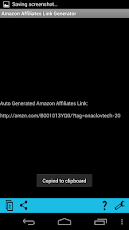
This app makes creating links trivial. I wanted the interface to be as simple as possible. There are only 4 buttons (possibly a 5th someday) from left to right, copy, share, help, settings).

Download Amazon Affiliates Link Generator.

How
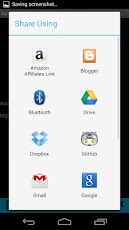
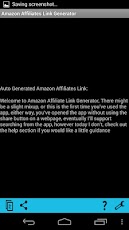
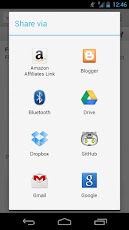
Simply visit the amazon page from your Android, click share, select the Amazon Affiliates Link Generator. It will open up the app and allow you to reshare or copy the link.
Easy as pie!

Ads
This app has no ads.


Check out my other apps as well as Amazon Affiliate Link Generator

Tuesday, November 27, 2012

Syncing Picasa

Anyone here have a Google Picasa account? How about 2? (I'm thinking families here) More?

Sure someone can share an album with you, but if you want to view it, you have to find the link, until google allows shared albums to be visible in your account (and indirectly visible via your Android phone). You'll have to just deal with it.

I got tired of dealing with it, I started working on a project, right now it does a one way "copy" from one account to another, I have plans to finalize the checks that compare the folders (albums) and determine what differences exist, and move photos back and forth to sync them.

My current implementation runs from a python script, and you have to have the Google API's loaded. This is great for those cases where you only need to sync once. However I want to sync say, once a day. Using this locally would require my computer to be running, what if my other family members wanted to sync albums with eachother? Now we have multiple instances.

Eventually I would like to set this up to run on Google's App Engine on a daily or more frequent rate, however oddly enough, their API's are not as clearly available via App engine.

On a positive note, I hadn't really done much programming in Python prior to this project, now I've begun, I don't mind it as bad as I originally had (don't get me started on the whole whitespace thing).

If you're interested in what I'm working on and would like to poke around, follow along, (or maybe help) you're welcome to check out the repository located on GitHub.

I'll keep you updated as I move along with this project.

https://github.com/onaclov2000/PicasaSync


Wednesday, November 14, 2012

Introducing Geek Book Club

If you know me personally you probably have heard of "Geek Book Club", basically we are a group of people interested in learning more technical things. Some work in technical jobs where we don't feel like we're learning enough new techniques to really make us valuable, and some don't work in technical jobs but find it interesting. Either way we're all here to learn.

I recently created a repo on GITHUB, so check it out.

https://github.com/onaclov2000/GeekBookClub

Thank you,
Tyson

Tuesday, October 16, 2012

Unit Testing with Structural Coverage


I don't love spending time testing, so I try to make the best use of my time. I write Unit Tests when I can, and automate any other testing if possible. Sometimes I try to even make writing tests easier on myself by using some techniques I picked up from The Pragmatic Programmer: From Journeyman to Master
Side Note: If you haven't read this book, stop what you're doing, go buy it, rent it from a library, borrow it from a friend I don't care, READ IT, LEARN IT. It's one of the best books I've read about software development hands down, lots of good ideas to improve your craft.

Unit Testing

Unit Testing code is helpful for looking at code you've written in a very controlled environment, you know the inputs and outputs, and being able to duplicate your results should be pretty consistent and easy. Often times this testing puts a single function or procedure through the paces, but depending on what level you are will determine what number of units will be involved.

Primer

After writing some code a few months back, I created what I thought were some good Unit Tests for it. They all passed in the end (and before they did, we found some issues when they weren't passing) which is great. The change got closed and merged into the baseline. I thought I had made a good attempt at ensuring that the software was solid. For the data I used I agree it is solid. Then a bug was found. I hadn't tested every case (even though I thought I had). What would have been a huge help is to have simply combined Structural Coverage with it.

Structural Coverage

Structural coverage is attaching special code to test for running through each path of your code. This is helpful for simply ensuring you've tested each route. This isn't a substitute for proper testing. I'll say it again. A structurally covered program is NOT a bug free program. It's simply a program that has been proven to work as expected for a (pseudo) normal scenario on each path encountered.

Combined Testing

By combining Unit Testing and Structural Coverage, you can prove that the Unit Tests at least are checking each case once. I have since re-ran the unit tests with Structural Coverage, and guess what? I missed a few paths, this didn't explain my particular problem, however it made it easier to see other possible problems I may have in the future. I have since added some unit tests and have made sure that my Unit Testing at the minimum covers each case.No program is bug free, but all we can do is analyze and pick the Unit Tests that we as Engineers believe will cover what's necessary.


If you don't do Unit Testing where you work, I highly recommending starting to do it on your own. From the start make it as easy to setup and run as possible, this will make sure that you will use it, and that your colleagues will use it. Additionally, look for opportunities to make the unit testing automated. If your unit tests run on the system everytime a build is ran, any bugs introduced in those pieces of code can be found quickly. This keeps you from violating the DRY principle, forcing yourself to repeat yourself testing it over and over. OR trying to fix the same thing multiple times because it's not caught at the right time.


Good luck!

Monday, October 8, 2012

Christmas Lights

Description
I finally got fed up. We bought a Christmas light "timer". This thing would do essentially 3 functions, the first was simply turning the outlet on, the second to use a photo sensor and turn off when it's light outside, and the final was a set number of hours (there being anywhere from 1 to 8 hours).  
The Problem
The problem with the hours one is that you have to manually turn it to off, then back to the number of hours you would like. This is frustrating. The photo sensor would seem like a neat idea, however when you don't get good lighting where the photo sensor is, you end up with Christmas lights on all the time. I (and in part due to my wifes request) decided this had to be rectified. 
Attack Number 1
My first run at it was to simply solder onto the point where the timer is on, and try to set and clear the 4 hour timer (but since the system needed to go back to off, then back to on, this failed miserably). 
Attack Number 2
Then I realized that the photo sensor should handle the turning off and on automatically, and I wouldn't need to turn it all the way off. I decided to remove the photo sensor, and put a pair of wires in there and a relay instead. Now the fun part. I have a PIC16F684 that I decided to control this with. With a multimeter I tested putting the photo sensor under the light in my room, when it was under direct light, the resistance went up really high, when I covered it, it seemed to reduce to a low amount of resistance. My guess is that I can put a resistor in line with the relay and whenever there is a high amount of resistance it turns the system off. When the resistance is low it turns the system on. Essentially what I needed was my microcontroller to activate my relay for 4 (or so) hours then turn it off. Then 24 - 4 hours later, it would attempt to turn on the relay again. If I can get this working on a short run, I.E. 10 minutes on, then 2 hours off, then 10 minutes on. I may consider putting in a pseudo random number into there, so the lights are on somewhere between 3 and 7 hours.
Unfortunately I plugged it in, tried shorting the pins for the photosensor (hoping it would activate the lights), well it didn't seem to matter whether the wires were shorted or not, the lights just stayed on.
Final Solution
I finally actually did what any smart engineer* should do. I took a look at what was already there. I saw 2 chips the first was a LM393 a dual voltage comparator. And the second was a programmable timer. JACKPOT. (Here it is for those of you interested: cd4541be). Looking at the datasheet I see there is a master reset line. I tested it out by turning the system on for 1 hour, then when the lights turned off, I simply tapped 3.5 volts to the MR line and bam lights were on again. I now have my "in".

On to the Microcontroller
I decided to use my Pic 16F684, I have a smaller one (can't recall the number at the moment), but I didn't have time to make sure my code ported smoothly as well as verify the timing. I did a couple tests using a couple nested for loops for a wait (I know, I know, I could have used a timer interrupt, and in fact i would like to go fix this, but I didn't have a lot of time to mess around with this and well, hey it was a hack)
So after some timing, I simply put an initial wait in there to get it to hold off to about 7pm from when I plugged it in, and then set the timer to 4 hours. The lights turned on for 4 hours, then a few hours later 7pm hit, and bam we have light.

However over the long term the timing was off for sure, when I got back from vacation it was definately wrong, I'll have to play with it this christmas again!

*Smart engineers keep things simple, and just using a reset line is MUCH simpler then the previous methods I tried.

Monday, September 3, 2012

Syncing ZSNES game saves across ubuntu systems

I was hoping to sync my ZSNES game saves across all my pc's. It turns out it take very little work.

First I made a folder in dropbox for my game saves and made a copy of my current saves out there.

Next I removed the contents of the zsnes folder located at
/home//.zsnes.

Steps:
(Make sure you've saved the files from .zsnes folder below first
cd ~/.zsnes
rm * (this gets rid of the files)
cd ..
rmdir .zsnes

Finally I setup a simlink from my dropbox to the folder so I always had my game saves synced.

Steps:
cd /home/
ln -s ~/Dropbox/zsnes .zsnes

Substitute the path with your path and bam you're done!

Good luck


Saturday, September 1, 2012

Environment Tips

This tip comes from Phil otherwise known as @civissmith on the interwebs.

Often times you have to swap between screens, I usually use alt/tab or some combination of swapping between document/editor in order to read and update. A neat tip Phil alluded to was that if you set your command line to semi transparent, you can still read any commands or notes while typing your code or commands over. This is a great tip as it can save time on having to constantly swap between (possibly losing your train of thought).

Thanks Phil and any other tips you pass along I'll be happy to post!

Wednesday, July 18, 2012

Energia Setup

There is a link in the "issues" section of the github site for energia.

Setup
Extract to a folder on your computer, inside that folder go to hardware/tools/mspgcc-4.6


Swap to super user. (may not be necessary but for sure need to use SUDO).

Then finally run bash ./build-mspgcc
A while later when it's done, you can navigate up a level to the same folder as mspdebug.

Make sure to set the execute bit on this file. This will require use of CHMOD. I just used 777 to be quick, but be careful as this isn't always the best choice of permissions.

Plug your launchpad board to the computer.

Now navigate to the main folder and run (at a minimum sudo) ./energia as super user.

This is the screen you get when you first start.

Ensure your board is communicating:
Select tools->serial port make sure something is there and selected.

Select tools->Board make sure your launchpad is listed and selected.

Select tools -> Programmer mine says AVRISP mkII not 100% if yours should be but these should already be selected automatically.

Test Program A.K.A Hello World
Select file-> examples -> 1. Basics -> Blink


Finally you get the above. Now if you hover over the second button from the left, you see it says Upload.

Click this button your board's led2 should be blinking (this is the led near the bottom of the board, opposite the USB cable, near a button and pair of jumpers).

You should be good to go, have fun and good luck, oh and,

HELLO BACK

Monday, July 9, 2012

IAMHERE 2.0

Well I finally released an update, and IAMHERE has been improved. I added categories of texts, as well as a share button.

There are a few categories and if you have any suggestions let me know and I may add them to my list of updates to include.

If you have any suggestions let me know and I'll definitely look into them.

Thanks and have fun.

https://play.google.com/store/apps/details?id=com.onaclovtech.iamhere

Wednesday, April 25, 2012

Introducing Proof of Concept Music Glove

Well the day I never thought would come has arrived. I have finished a proof of concept of my android music control using an external (in this case glove) device.

It was a long and slow journey, I've often times got so many projects in the pipeline that it's really exciting when I get to see one finish up.

This evening I finished up wiring my device, and asked @civissmith over to help with the video, so Thanks I really appreciate it, trying to do what I was showing with one hand would have been, painful to say the least.

Basic concept, Buttons attached to arduino send characters to android app, when music is running, pressing a button allows control of the music app.

Shot of Glove
Shot of Glove


Button inside glove


Without further words, I think the video will be proof enough.


If you'd like to follow me on twitter I can be found here: @onaclov2000

Monday, April 16, 2012

Causing the next song to play

With the android music player you can change songs using the following broadcast. It's not guaranteed to work with any other music players, or even with any updates they make, however it works for what I need right now (I have no interest in making a music player), If you have a music app and have an intent to change songs,etc, please let me know and I'd be happy to support if possible. I found this across the interwebs somewhere probably nearly a year ago now, I can't remember where I found it, or who wrote it, so if you are the one responsible I would love to give you credit (i'm sure it came from stackoverflow at one point, but after a lot of searching recently I can't seem to find anything about it).
Intent i = new Intent("com.android.music.musicservicecommand"); i.putExtra("command", "next"); sendBroadcast(i);
Good luck.

Modifying Bluetooth Chat

I started out trying to pull the android bluetooth chat application from the developer website....BAD IDEA. I spent quite a bit of time commenting this out, adding a toast here and a if then there. That one is built for a different sdk version than I'm using, so my recommendation would be to pull it from the examples folder in the sdk download.

Well I finally grabbed the bluetooth chat application from the sdk examples folder (when you download from google). After about 5 minutes I tried loading the default app on my phone and touchpad, it worked just fine. I then changed ONE LINE of code and my arduino can talk to my android devices with bluetooth. What line say you? This one:

In the BluetoothChatService.java
From
private static final UUID MY_UUID = UUID.fromString("fa87c0d0-afac-11de-8a39-0800200c9a66");

To
private static final UUID MY_UUID = UUID.fromString("00001101-0000-1000-8000-00805F9B34FB");


That's it that's all it took. Apparently that UUID from what I've been able to gather is for the bluetooth serial interface, so that's all I needed.

Here is video proof of the application in action.


http://youtu.be/Zof0IYUU71Q

Good luck and let me know if you have any questions.

Monday, April 9, 2012

Ada Withs

Eclipse has a really nice feature which allows through a keyboard shortcut the ability to update the imports required for your code.

I liked that, but didn't know of anything that did the same thing for Ada source code.

I have began creating a script which does this, and you can use programs to run it, (perhaps port it to a plugin for a program).

I called it Ada-Withs (I know it sounds pretty boring)

It's not complete, but right now the script will pull out all packages used in the program.

If you want to give it a try go for it. If you want to mess with it, pull and let me know if you have any improvements.

The link above does go to it but here is the full url as well:
https://github.com/onaclov2000/Ada-Withs

Wednesday, April 4, 2012

One Language to Rule Them All

Do I think that there is one language that is best? No. I can say that with a high degree of confidence. Each language has it's own idiosyncrasies. If the first language that was created was the best, we wouldn't be using anything else. But we all know that there are issues with each language, and each language was often created to make an aspect of another language easier/better.

Last week I recommended not attempting to solve a particular problem with python. The solution was already partially coded up in perl and it just didn't make sense to re-solve the problem (simple data parsing) all over again. It got me to thinking, was this the right suggestion? I think the final result of the script should have been in perl, however learning to do it in python was a good idea. It would improve their toolbox.

I realized I should encourage writing things in a variety of languages. Why? So you know which tool to use. I came to realize that parsing data was easy to do in perl 90% of the time. If I knew python better I would probably feel the same way about python. The issue isn't about python vs perl vs java vs c++ vs c#, the issue is knowing what to use when.

I know that if I want to make a simple fast to build gui application I can use Visual Basic. Joe Blow will use Java, and Jim Bo will use Perl. Are any of them wrong? No, what you use, depends on your tools available. If you know how to do the same thing in 5 different languages, you'll start using a default for one set of problems, another for another, and mixing them if necessary.

I can solve the same problem in every single language, but the issue is, which is easier to do it with? Do some research, if you find that dragging and dropping a button onto a form is easier then writing the back end required to create you idea. DO IT! There is nothing more encouraging then building something and actually seeing it working, then spending tons of time building something and never seeing it come to fruition.

Good Luck.

Monday, March 12, 2012

New Apps

New Apps Released!
Well it was a busy couple of weeks, I have released 2 apps on the market in the last few weeks.  Pizza Area, and I Am Here.

Pizza Area
This calculates the square inches of a pizza for you (really works for any size circle with a diameter), Also if you have a price it'll calculate the price per square inch, as well as the estimated cost at that rate for the pizza size smaller and larger that the app contains. Give it a try and let me know if you have any suggestions, and as always a positive rating on the appstore would be appreciated.


I Am Here
This app will allow you to select a friend from your contacts (or type the number in) and when you hit the icon it'll send a message. This app is very similar to another one on the Apple Market, I was a little disappointed I hadn't released this sooner, my buddy civissmith had come up with the idea originally,  and I was just way to slow to implement. Well give it a try either way, I think mine has a little more spunk then the Apple Market version.

That's all for now, I have so many projects in the works at all time, I just have to finish a few so I can write about them.

Thursday, February 16, 2012

GraphViz

I decided to start playing around with GraphViz, here are a few of my notes:
To call a file use the following command (works for me).

dot .gv | dot -Tpng >.png
This generates a png file.

Next up what the .gv file contains:

digraph G {Hello->World; World->Earth; World->Mars; World->Jupiter}

It looks like if you call it a digraph, and give it each of the start/finish points, it'll graph them for you.

I'll be back with more as I discover more.

Friday, February 10, 2012

TrueCrypt

I was having problems getting truecrypt to work on my ubuntu machine. Once I downloaded it and unzipped it there was no extension and for some reason my machine didn't know what to do with it. I simply renamed it with a .sh at the end and re-ran the file, everything worked as advertised at that point.
I.E. FROM: truecrypt-7.1a-setup-x86
      TO: truecrypt-7.1a-setup-x86.sh


Good Luck

Tuesday, January 10, 2012

Android Like SQL Statement, sqllite sql software

While using sqllite sql software for android, I was runing into problems. I was able to do exact matches, but for some reason I couldn't get LIKE matches to work. I was hunting around like crazy trying to figure out how to write a LIKE statement in Android. I had a working example of '=' and figured it would be pretty simple to use the LIKE command. After many variations I just couldn't figure it out. I almost posted to stackoverflow but decided to read the information on the "rawQuery" parameters of the database methods.

After doing a little reading it turns out that if you enter in a ? in your query it pulls the selection arguments and stuffs them in where that ? is. My first example didn't exactly make it clear that ? was replaced with the arguments, so now that I knew that it led me to my next train of thought.

As silly as this might sound my original query that pulled exact matches in used this:
cursor = db.query(DBHelper.TABLE, null, DBHelper.C_TEXT + " =?", whereArgs, null, null,null);

I finally tried this:
cursor = db.query(DBHelper.TABLE, null, DBHelper.C_TEXT + " LIKE ?", whereArgs, null, null,null);

Guess what? The whereArgs get stuffed in the ? position.

As much as I could have sworn I tried this, apparently I tried various iterations. Be sure if you're going to  use this, make sure you have "column" space "LIKE" space "?" and then your arguments as the next parameter. If you notice that the first example I was using had no space between the front, between the = and ? as well as behind, this is part of what tripped me up, LIKE is a word so you have to be sure to separate them using the right spaces.

If you're not sure what a column is take a look at W3 Schools SQL Like Tutorial. It doesn't explain the ? and how that works with respect to android. But after reading to this point you should be able to use the LIKE command in android.

I hope this helps others, so long and short of it, I can now query my db with a like operator, and it works.

Note* whereArgs contains only one element which contains % on either side in my case (%string%). Perhaps in the future I'll poke around at the options when I have more then one string in that field.

Monday, October 17, 2011

Music Glove Part 1

Well after much heartburn (and once again being burned by pull down resistors). I have managed to make some progress.

I now have half of my Music Glove prototype complete. This is the hardware side. I paired a bluetooth module from sparkfun (something that does uart). With an arduino to handle the button presses. I can now receive an A and a B from my button presses on my phone using the BlueTerm application.

Once I am able to handle receiving the bluetooth data on the phone side, I will better package the whole assembly.

Here is a shot of the circuit:


Here is the code which does all the work:

/*
  What you will need to do is wire up your bluetooth module hooking the RX and TX up to the arduino, then

 */

// A is IO 2
int A = 2;              // Switch connected to digital pin 2
int AState = 0;              // Switch connected to digital pin 2
int AStatePrev = 0;              // Switch connected to digital pin 2
// B is IO 3
int B = 3;              // Switch connected to digital pin 3
int BState = 0;              // Switch connected to digital pin 3
int BStatePrev = 0;              // Switch connected to digital pin 3


int buttonState = 0;


void setup()                    // run once, when the sketch starts
{
  Serial.begin(115200);           // set up Serial library at 115200 bps
  pinMode(A, INPUT);    // sets the digital pin as input to read switch
  pinMode(B, INPUT);    // sets the digital pin as input to read switch
}


void loop()                     // run over and over again
{
  AStatePrev = digitalRead(A);              // Switch connected to digital pin 2
  BStatePrev = digitalRead(B);              // Switch connected to digital pin 3
  delay(60);
  BState = digitalRead(B);              // Switch connected to digital pin 3
  AState = digitalRead(A);              // Switch connected to digital pin 2

  // Handle button "2" presses 
  if (BStatePrev==BState)
  {
    if (BState == HIGH)
    {
      Serial.println("B");
      delay(60);
    }
  }
  // Handle button "1" presses
  if (AStatePrev==AState)
  {
    if (AState == HIGH)
    {
      Serial.println("A");
      delay(60);
    }
  }

}

Tuesday, August 16, 2011

Folder Permissions

I've been having problems with folder permissions on ubuntu, oddly enough, trying chmod 777 on stuff wasn't really working well, basically I just did gksu nautilus then I modeled the "permissions" tab to the same as a folder I wanted permissions to be the same as. Apply to all files/folders within and viola it worked.

Hope that helps others.

Originally found the command from http://ubuntuforums.org/showthread.php?t=1086624 although I have heard of it before, just haven't used it much.

Tuesday, August 9, 2011

Boxee Update DEB

I was hoping to download boxee for my recently updated media server.

Turns out that boxee has some issues with the package downloadable from here:
http://www.boxee.tv/make#content

The original site I built the script to mimic is located in the source code.

The file which did the job for me can be found here:
Boxee Deb Fix


Good luck!

Friday, July 29, 2011

getc/getchar why doesn't it wait?

So getc is basically the same as getchar but to get the same effect
getc(stdin) = getchar basically.
From the above link:
Returns the character currently pointed by the internal file position indicator of the specified stream. The internal file position indicator is then advanced by one character to point to the next character.

What this means is that this is not a "wait for input" type operation, it literally will grab the next character from the stdin stream unless you find a way to prevent it,


Example function from code to be used:

char getMathSymbol()
{
while (getchar() == '\n') // use this or getchar will not wait for input.
{
// temp varaible
char userSymbol;
cout << "please enter yoru math symbol" << endl;
// need getchar to get a character from the console
      userSymbol = getchar();
      
//cout << "getchar done" << endl; // debug code
// return your symbol
return userSymbol;
}
}

For Example you entered in the following:


Enter your first number
1
Enter your second number
2
please enter yoru math symbol
+
3


Lets look at this again, with all (hidden) characters visible
Enter your first number\n
1\n
Enter your second number\n
2\n
please enter yoru math symbol\n
+\n
3


When you hit getMathSymbol
you are at this point:
Enter your first number\n
1\n
Enter your second number\n
2\n
please enter yoru math symbol\n

When you get the char, the \n is grabbed (which is why the "while loop works").

So what I suspect happens is that we hit that \n and since it's a valid character (not end of line or end of file) we grab the character and exit the function. (when the while loop is gone).

What happens if we read the last character to increment to the next char (which is EOF or EOL)?

char getMathSymbol()
{
//while (getchar() == '\n') // use this or getchar will not wait for input.
{
// temp varaible
char userSymbol;
cout << "please enter yoru math symbol" << endl;
// need getchar to get a character from the console
           userSymbol = getchar();
           userSymbol = getchar();
      
//cout << "getchar done" << endl; // debug code
// return your symbol
return userSymbol;
}
}

After compiling, it looks like it works, so what happens is that if there is a valid character the getchar returns immediately, if the next char isn't valid, then it waits until a valid char occurs.

Make sense?

Thursday, July 28, 2011

Forward Declaration vs Function Prototyping, What's the difference?

Valid Conditions
The following will be how we can get a successful compile.

This would be using Function Prototyping:

### BEGINNING OF FILE###
... // declarations of whatever you want

void INSERT_STRING (char b);

int main()
{
  INSERT_STRING("A");
}


void INSERT_STRING(char b)
{
  // Where INSERT STRING is literally implemented.
}
#### END OF FILE ####


This would be Forward Declaration.

### BEGINNING OF FILE###
... // declarations of whatever you want

void INSERT_STRING(char b)
{
// Where INSERT STRING is literally implemented.
}

int main()
{
INSERT_STRING("A");
}
#### END OF FILE ####

Now what this last one means, is that if you wish to use INSERT_STRING, it must be fully implemented above the calling function (in this case main).


### BEGINNING OF FILE###
... // declarations of whatever you want

void INSERT_STRING (char b);
void USE_INSERT_STRING();
int main()
{
USE_INSERT_STRING();
}

void USE_INSERT_STRING()
{
INSERT_STRING("b");
}
void INSERT_STRING(char b)
{
// Where INSERT STRING is literally implemented.
}
#### END OF FILE ####

This is because the function has been prototyped, when the compiler goes to use it it knows that some function exists that has such and such properties and then it won't complain.
When it finally hits that function it compiles it, I am pretty sure that later the compiler comes back to the USE_INSERT_STRING function and replaces the "pointer" (or however it knows where to go to "call" the function), with the location that INSERT_STRING finally ends up, but don't quote me on it, as I'm not 100% certain, and I don't know compilers that well. If someone can confirm I would appreciate it.


Error Conditions
The following will contain some examples of how we can fail to compile.

Post Declaration with No Prototype

### BEGINNING OF FILE###
... // declarations of whatever you want

int main()
{
INSERT_STRING("A");
}

void INSERT_STRING(char b)
{
// Where INSERT STRING is literally implemented.
}
#### END OF FILE ####


Gotcha
This time it is by another function then main. You might have thought you were safe, but this should fail as well.

### BEGINNING OF FILE###
... // declarations of whatever you want

void USE_INSERT_STRING()
{
  INSERT_STRING("b)");
}

void INSERT_STRING(char b)
{
  // Where INSERT STRING is literally implemented.
}

int main()
{
USE_INSERT_STRING();
}
#### END OF FILE ####

The above fails because again the compiler is trying to use the function INSERT_STRING in USE_INSERT_STRING, and since it's not been "forward declared" (declared before it's used), it fails.

Saturday, July 16, 2011

Building an Echo Server using Bluetooth and Blueterm

I recently picked up the Bluetooth moduleRN-42 This was a cheap low cost way to integrate Bluetooth into an upcoming project. First up was getting the pieces soldered. Thanks to Walter over at Walter's Epic Blog he hooked me up with a great soldering job.
He soldered up the power, ground, tx and rx lines, as well as the required SPI lines in case I need to program the device.
I got the itch a little bit ago and started doing some research on building an Android App to communicate with this thing (with the eventual plan to hook it up to a microcontroller). I found BlueTerm this program connects to a Bluetooth Device and sends UART data across.
I started thinking to myself I wonder how I can echo the data back without having to build the UART up for my microcontroller. I asked the question over at electronics.stackexchange, and of course being the impatient type I just jumped in and hooked the rx to the tx lines.
As you can probably guess from the little jumper above, those are the RX and TX lines. It worked, I type something and bam it echoes it back. I'll be posting more as I build this project up so stay tuned.

Sunday, July 10, 2011

AsyncTasking

I was attempting to place my calculations from eecon into an AsyncTask.  I initially thought I would make a common task, calling it from both my find factor activity, and my find interest activity. I had to deal with the whole mess of figuring out which one was being called, and whatnot. Then I ran across the problem of getting the data back from the task. I initially tried using the getstatus function that async provides, as well as the get function, this returns the result. Seems great right? WRONG! get is blocking, this means that when I kick off the async task, it doesn't just kick off and run and when it's done let the UI know it's done, I FROZE the UI. This is bad.  Now if my calculation is time consuming then we have a chance at a force close. I wanted to try to pass the data back to the UI components so hopefully I wouldn't have to cause the main thread to wait. I wasn't sure how to do this, but after reading about the AsyncTask more, I realized that the onPostExecute was supposed to update the calling UI thread. Finally I realized (after a little reading) you can place the AsyncTask class in as a subclass, this allows it to have access to the parent's elements. 

No more blocking and no more force closes from this calculation.

Good luck and Good night.

Saturday, July 2, 2011

Admob in Android

This link is great for just throwing a quick ad in with admob into your app.

http://code.google.com/mobile/ads/docs/android/fundamentals.html

followed by the following:

http://code.google.com/mobile/ads/docs/android/banner_xml.html

Basically you add the "publish code" jar to your app, then insert a few lines into your manifest. Then you place the banner into your app where you want.

The one piece that tricked me is that if you simply try to add the sample xml unit to your project you need to make sure that in the main layout (the one that declares the "android" namespace), you need to add the following:

xmlns:ads="http://schemas.android.com/apk/lib/com.google.ads"

Monday, April 4, 2011

Job At Google

Well I finally did it, I applied at Google, I don't know if I'll ever feel ready with the epicness this company has brought to every household. If not, I won't discourage, I'll keep working, if anything I'll create a business that Google will want to buy, so I'm not too worried, if it doesn't happen now, it will someday, but then again someday I might be ready for my own business and will be able to R & D on my own merits.

Here is my submission window, I was kinda excited: